I... have a problem. I recently had ~1600 tabs open in Firefox. With a lot of painstaking effort I cut it down to ~750. Quite some distance to go still.
The default interface sucks once you have more than 50 tabs. I wish there were easy REPL-ish programmatic access to the list/dict of tabs (so I could filter out all GitHub tabs, or close all stackoverflow tabs, etc) and that was a first class citizen in the browser interface. This is one reason I’m really excited about the Nyxt browser.
PS: Part of it might be FOMO, but part of it is also that these links represent certain threads of thought/exploration and are like bookmarks of things to revisit at a later time. Yes, in principle I could export the list of tabs to a text file, and begin anew, but that’s not a fully satisfactory solution. I think we need tools & interfaces to better (more holistically) accommodate people’s intellectual workflows; what we have today is geared much more towards consumption.
As an example: why can’t we easily group tabs into projects and have bidirectional sync between the browser and project related resources (Eg: Some markdown/org file, or sync with Evernote/Notion/Roam, etc) so that whenever I resume working on the project, I get a warm start with the context mapped out (continuing from the previous session). And I want a much tighter relationship between my tabs and my project notes (akin to bibliography of references), including annotations on webpages, etc. If we are to use the web more effectively, the ecosystem surrounding browsers needs to grow up and help us get there.
This is quite a staggering amount imo... Why not just avoid painstaking and just start fresh? Is this a form of FOMO?
Edit, you are at the point where you need a search engine for your tabs, you might as well close them and use the internet directly instead of cached in your own tabs.
If I may ask, on what basis did you close all those tabs, did you read them all? What will you do with the rest?
Memex (https://github.com/WorldBrain/Memex/) provides for searching your history and bookmarks. That might help alleviate the need to maintain sets of tabs.
The Vimium extension for Firefox also happens to provide basic filtering of open tabs, although I've never tried it with anywhere near 1600. YMMV.
Other commenters have already mentioned Tree Style Tabs and similar extensions which can aid in grouping and managing things efficiently.
> URLs bit rot and their contents change. If you have a browser session that's old enough, the RAM contents are a saving grace.
This is a serious problem in my experience. To that end, Zotero is an invaluable research tool with browser extensions for (among other things) taking a snapshot of an open webpage. Its library exists externally to your browser though which might add friction to your workflow.
Safer and not a whole lot of work to backup your bookmarks if you're worried about changing or disappearing pages. Probably have a net time saving pretty quickly from regaining access to being able to use tabs as tabs again.
Shift-T for tabs. Shift-O for history, bookmarks, and domains (ie domain names that you've previously visited a page from IIUC). Like Vim itself, there's probably other useful functionality hidden away that I still haven't found out about yet.
I'm sorry to hear that Nobody should have to wade through 1500+ tabs.
It's frustrating to hear anyone struggle with that in this day and age. I've been there myself. But there are technical solutions.
I haven't had to deal with tab anxiety in years.
My browser stack is Tree Style Tabs, Session Manager, Multiple Tab Handler, and Tab Group Plus.
I regularly wrangle clusters of tabs.
If I have a tree of tabs that is spawned from an HN story or something, I can drag it into a new window, and then export it to a tgmg file from Tab Group Manager, put the tab collection file in my repository, and put a reference to it in my knowledge base. I might also embed it in an rtfd file.
If I don't need that kind of structure, I can just use shift or ctrl to bulk select the tabs I want, and paste the urls into my knowledge base. And effortlessly restore the list of urls to a new session when I want.
I'm able to re-create not just specific urls, but the context that I browsed them in.
If it is months or years later, it is really helpful to have a tree or list of urls, and maybe some notes. That makes it so much easier re-inhabit my state of mind during that research session.
I doubted whether it would be worth perusing, but I'm really glad I did. I love being able to recall research threads I started years earlier.
Unfortunately, it takes some effort to get set up to digest lots of tabs. I wish that this was recognized as more of a problem. It is so idiosyncratic that we are using open browser tabs as a temporary database to store lists of urls. Browsers should combine history, tab management, and bookmarks. It makes no sense anymore for those features to be separate from each other.
Yeah I usually have no open tabs at the end of a session. The point is that with the right tools, you can bulk capture the essence of what you were browsing without letting clutter accumulate.
Sounds like a great approach, can you tell us more about it? Do you have subfolders? Do you move or delete bookmarks when you are "done" with them? Would love some details. Thank you for the inspiration!
You are at a different level. No I am not being sarcastic. Anyone who is able to concentrate with more than 10 tabs open has my respect.
I figured that bookmarks, downloaded files, and open tabs for more than a day are mostly causing me remorse for not being able to ever get to those again. So I focus on tasks and use search to open what I need.
Is it just me or is Tree Style Tabs fairly buggy when it comes to focusing tabs after closing one? It seems half random to me.
It's also fragile at browser startup, sometimes the list is empty or the tabs are in a flat list. When I switch to bookmarks and then back, it's fixed.
So, generally very fragile. Which is annoying since the CONCEPT is so essential.
At that point isn't it better to just set up some bookmarks? Navigating 700 tabs is much harder than navigating a hierarchical bookmark list.
Personally I only keep open tabs that I am actively working in, if I have more than ~15 I get less productive since I have to hunt through to fine the one I need. Several times a day I just clear out all my tabs aside from a couple pinned ones.
I find the interface for Bookmarks sucks also. 'Show all Bookmarks' presents a clumsy floating window you need to arrange with your browser window and is useless for batch operations. You can do 'Show Sidebars' but pressing delete on a selected Bookmark doesn't do the obvious thing of deleteing a bookmark. Its quite cumbersome to right click -> context menu -> delete when you're pruning dozens, hundreds of things.
Bookmarks discard window layout, scroll bar position, back/forward history, form contents, etc. They don't stay in sync with tabs so you have to delete and recreate them.
I bookmark all tabs with CTRL-SHIFT-D then arrange the hierarchy manually in bookmark manager. Doesn't automatically do it all, but keeps me involved with my bookmark trees.
I'd say that if you need 1000+ tabs, there is a problem. Not with you but with the browser.
I mean, how can you not get lost? Do you realize the thing you are looking for is on tab 248 before lookin it up again?
At that point these are not tabs anymore they are a directory or a history. I think using tabs for that is totally inadequate.
Unfortunately, browsers tend to be lacking in that department. They have a list of closed tabs to restore, but limited to a ridiculously small number like 10. They have a bookmark system but it doesn't save the state of the page like a tab. They have a history but it fills up with crap too quickly.
An unlimited, easily searchable tab close history could make keeping lots of tabs unnecessary. It is much easier closing a tab when you know it won't be lost.
Props for being one of the few people to realize it's a tooling problem. The "umm why would you have so many tabs?" you always get on HN is a reminder of why most people are so bad at UX. Most people just can't see outside of their usage.
You're onto something here. I have a lot of tabs because it's a history of one thought to another. It's not just a set of tabs, it's a sequence of locations. Keeping them open is how I can remember to go back to them, how I can keep my state in them, and more.
I can envision a much better UX where your tabs become some sort of history entry where they are frozen in time (serialized to disk) and can be rehydrated. And you can easily scrub back to them even once they've been unloaded from memory and frozen. And you can create different sessions for different things, a window/session for today's HNing, one for today's work, one for play, etc. And you can reach back into historical sessions to load their state. And merge another day's session into today's because it had some outstanding tabs you wanted to get back to. And there'd be good ways to visualize this.
I know some things like tab groups and tab sessions exist. I personally use Firefox with tree tabs to get something like this. But there's more UX thought that could be put into it instead of just wondering why someone would want a bunch of tabs.
One of the main reasons I'm reluctant to close my browser and trash my tabs is because the exact sequence of tabs, what's open, the order they are in, the state on each one (like being paginated to page 58 in some in-browser book scan UI) is a snapshot of by brain and digital "desktop" at that moment. You're right, browsers do very little to help.
> I can envision a much better UX where your tabs become some sort of history entry where they are frozen in time (serialized to disk) and can be rehydrated.
Mobile Firefox already has this. Desktop Firefox might have a version of it, but I'm not sure (sometimes I see a loading spinner on a gray background for a while).
I think you're totally on the right track. What I envision is the ability to drag a tree of tabs into a bookmarks folder to get back to it at another time.
Fundamentally tabs, bookmarks and history entries are all just references to URLs (with a bunch of metadata) anyway. It's weird to me that the UX of these hasn't really converged all that much yet.
> how can you not get lost? Do you realize the thing you are looking for is on tab 248 before lookin it up again?
For me it works like “memory palace” technique. Driven by addiction a graph structure with multiple root node starts to build up so I can follow traces of thoughts and contexts among tabs and windows.
"Yes, in principle I could export the list of tabs to a text file, and begin anew ..."
I came here to complain that, actually, you can't.
Or rather, it's surprisingly complicated to export a simple list of current tab URLs to a plain old text file.
You need to dig several directories deep into /Library (or whatever, depending on your OS) and then use JSON tools to export ... I've already lost most people.
Why can't we just have:
about:tabs
... which is nothing but a one URL per line, text listing of all of our currently open tabs ? How simple and nice and useful would that be ?
Go searching for "how can I export tabs" or "how can I save tab urls" and you'll see thousands of people trying (usually in vain) to achieve this very, very simple thing.
Consider this an official, public bounty. Expires 2020-12-31.
I don't have time to write this patch but I especially don't have time for the lame, tired suggestion that FOSS cannot be critiqued by anyone but the authors.
(The bounty is $1500 if you "jhardy54" write, and have accepted, the patch. Consider the extra $500 compensation for this unexpected loss of smug, righteous indignation.)
Thanks for the bounty. Is this resolved when the patch is written and available for anyone to include in their source tree, or when it's merged into the Firefox tree?
(I want to clarify because I've had a patch open for 4 months that's received no attention from maintainers.)
Since my last patch (bugfix, one line) has been open for at least 4 months without activity I'm not sure how feasible it would be to land a new feature and have it releases in Firefox stable in ~3 months.
1. Tab groups: I have been an extensive user of tab groups in the past (when it was native in Firefox); it’s very helpful if your tabs cleave nicely into less than a dozen or so projects/themes, and you have no more than a few hundred tabs.
2. Tree style tabs: The extensions I’ve tried tend to be very slow and non-ergonomic for my use case.
3. The % trick: Didn’t know this; thanks!
4. Bookmarks: Yes, but browser bookmarks tend to be where information goes to die. It’s also very hard to organize in a useful way, or attach notes to it. How about some of the ideas in my parent comment, as a spiritual extension of bookmarks?
I agree that bookmarks are a relic. Workona (http://workona.com/) might be of interest to you. It combines tab groups with resources (our term for bookmarks). But unlike regular bookmarks, resources can be grouped, ordered, or reorganized easily. They display important info at a glance (favicon, page name, type of object like GDoc). They won't open a duplicate tab if one is already open, and you can even
replace your open tabs with a different set of resources (you choose which ones). Oh, and you can share them. So, bookmarks but redesigned for modern work. Would love to hear what you think if you decide to try them.
I have both, and while I haven't used Sidebery as much as I should (since I've known and become accustomed to TST first), I can say at least this: Sidebery has tabs groups. These display as icons to the side of the tab tree, and when you select one it will show the tree of tabs in that group only.
And then you can organise them somewhat into groups ?
I use tree style tabs with some custom theming to make it take up only enough room on the left to show the site favicon. It then opens up when I mouse-over.
I used TreeStyleTabs for a few years. But then, one day, I accidentally closed it -- and the browser was running so much faster I can't stand TST anymore.
I re-open it every month or so, and it didn't really change.
I can't notice it when I have 10-100 tabs open. It's unbearable when I have 1000 (which happens more often than I would like to admit).
It should be noted, though, that my web browsing machine is an early 2013 MacBook Pro with 8GB of RAM; It's possible I wouldn't have noticed on a faster machine.
On the same hardware, the same browser with TST disabled (and no auto-suspend) easily handles 1,000 open tabs - slightly slower than it handles 100, but barely noticeable. With TST it is unbearably slow.
I find Tree Style Tab even more useful than the old Tab Mix Plus extension. Anything I open from HN will be a child of the HN tree, which can be opened or closed as a group.
I recently "closed" 12000+ (not a typo) tabs in one of my Firefox profiles into OneTab. In another profile I have 30+ different windows open for different projects and contexts, and I have more profiles (typically one per WM workspace which are topical).
I've tried lots of browser addons/extensions and tools over the years, but none offered proper salvation. I have a design in my head of what kind of tool I'd like, but like everyone else I have no time between work and everything else to build it.
Long ago I used to blame the tools, but these days I realize it's me. I put minimum 32 GB RAM into my boxes, and it's because of VMs and browsers.
I'm there with you (1500+ in one browser instance). But I don't consider it a problem. I have tab suspend and full text tab search via add-ons, I group my tabs linearly by topic and date, and the older 1/3 of tabs I know position by heart. Because I use a single process browser+noscript instead of a "modern" JS-engine-centric browser (ie, Chrome/FF) even with 600 tabs of 1500 loaded in my ram usage is still under 3 GB.
Minimalism and other philosophies don't really translate over into digital spaces. I have as much "space" as I want and nothing gets in the way of anything else. I see no problems with my status quo since 2003.
It's easier to use Chrome for my work browser, so it only has a few dozen tabs open, but my primary home/sidejobs browser is Firefox, currently running at somewhere in the 1600-2000 tab range. Only Firefox can do that without barfing. (And that's on the old Surface Pro 4 i5/8GB - it runs just fine.)
I REALLY miss TabMixPlus, though... (a FF extension broken with the purge of XUL from Quantum)
Whenever I have more than 10 open tabs, I close all of them. Searching a URL from a fresh browser is faster than browsing through tabs, especially with the history in the URL bar.
Without addons, I “solve“ this by opening a separate window for each train of thought. When it comes time to go Marie Kondo I either close the window or bookmark all of the tabs for later.
This works great at home. At work I’m constantly fishing for which window some bit of information I currently need is in (though I’m not sure one window would fix that any better). So even MMMV.
So many health and monitoring tools have a web UI these days. Someone chats about a server acting weird, you’re in the chat, looking at logs and graphs in several spots, maybe using your own app, looking at commits in several modules, and looking up error messages online. Spread out across 2-4 screens.
Plus there’s whatever feature or bug fixes you were working on before that all started, and the research you were doing for a ticket you want to propose, and you have to get back to those when you’re done.
And somewhere there’s a window with this HN post you have to find again in order to respond.
I don't mean to be rude but I think this is maybe a psychological issue, not a technological one. I'm doubtful that 1600 tabs open in any way reflects some advanced or thoughtful way to work, it's just problematic.
'Junk Hoarders' -> 'Tab Hoarders'.
Maybe find a way to truly organize bookmarks and find a good bookmark manager plugin that lets you 'get to your stuff' as you need it.
I am in the same boat, and usually use that as "post-its", reminders of my current trains of thoughts. I can pick-up something, switch to something else, close that thread of tabs, and come back to the previous state. If something urgent comes up, I open a new tab.
Treetabs is useful for that kind of workflow, but very slow. I also use panorama tab groups.
If you're already on FF, you need tree style tabs. This extension is so popular it has its own extensions.
I also have dozens of things I keep an eye on, so there's no way tabs across the top would help me at all.
Main things I find useful about TST:
- You lose horizontal space, not vertical. This is great because you can now read the titles. I also do some magic to get rid of the tabs across the top, so I get some space back vertically.
- You can collapse a given tree.
- You can suspend a tab or a tree. Let's face it, most of your 1600 tabs do not need to be using resources. With suspend you keep the title and place so you don't lose it from your brain, but it doesn't sit there and eat RAM and CPU.
- You can style the sidebar to your liking. I like to make sure mail and slack tabs are their own colour, because they tend to be project roots from which many other tabs are spawned, and when they're uncollapsed I want to visually separate a set of tabs from the next. I also highlight the current tab.
Sometimes the line items in the history list aren't really informative, and if you can't recall what particular day you might have visited the page you might have some homework in front of you. I wish the entire page was catched in some way so I can search for a keyword or use some regex to make sense of my foggy memory. This is a computer for crying out loud, I should be using regex, not feeling like I'm digging through a filing cabinet of reciepts by hand, which is exactly what the experience is when sites title themselves opaque things like "Add Comment | Hacker News" for the 2000th time in your history log.
> use your browser's history function to find them back
This is what I do when I need to look something back up and it works pretty great honestly.
It seems like it might be a difference between Firefox's behavior and Chrome's though, because any time I've used chrome the suggestions it fed me were autocomplete results from google search.
The great thing about Firefox's "Awesome bar" as I think it is (or was) called is that it looks through your history and ranks things based on frequency / recency of visiting.
So if I want to look up something, there's a good chance I can just start typing the word I remember from the page title and it will pull up the result for me.
Firefox does let you select multiple tabs and bookmark your selection as a folder, it also lets you expand a folder of bookmarks as tabs. I don't use either feature though, as my tab use tends to be more around not closing a tab until I'm done with the task associated with it, by which time I've opened another dozen and working out which I can close is too much effort.
I had a quick look (because actually, having tabs load for a specific project would be quite helpful) and it looks like that might offer some of what you want?
If you really are digesting any substantial degree of 1600 tabs it sounds like you need a tool like a personal wiki to file info and something like rss to manage incoming sources of data.
If you just find yourself unable to close stuff you have read once and will never touch again you need to train yourself to use your tools more effectively.
If you strap enough engines to something it qualifies as a jet including a bike but it doesn't make it a reasonable means of transport.
Get a 'tab group' add on, Simple Tab Groups for Firefox. There is something similar for Chrome but I don't know off the top of my head.
I have a different group for any 'context' I often return to (or even a dump of 'researching random thing I may one day come back to'). Then I have one window open and I switch between contexts as needed and pick up from where I left off.
Have you tried OneTab? It's an add-on that squashes all your open tabs to a list and saves the list to a page. You can reopen tabs, remove them, etc. from the page. It's super good.
But for me at least, I've realized it's less about keeping content for later, and acts more akin to the conversational bridge "well, if it's important I'll remember it later" -- It just gives me permission to let the tabs go and move on, with a pretense that I'll maybe come back to them :)
That's a good way of putting it. The problem is remembering it later is very difficult with so much information. I use Tablerone so save and organise pretty much anything I think might come useful at some later point. Then I can find specific sites either by searching by the subject/collection I saved it in or by browsing the timeline... https://tabler.one/
I use tabs as a mindmap, and would really like the browser to present it as such.
An interface such as pearltrees would be a pretty good start, with visible links from topic to topic. The ability to collapse a group and all of its children, close a topic, annotate some tabs, full-text search, and maybe have them open again at a later date.
Maybe I'll get around to developing this at some point.
For instance, I am currently looking for accommodation, in addition to the usual stuff. I tend to open a (panorama) tab group for each sector or website, then a tab for each apartment, plus maybe a few more tabs for each to check on the map, pictures, contact forms, etc. I do not do that activity all the time, but need to leave that open to come back to it. I actually created a Firefox profile for this, but I'm using it to reply to this thread, so maybe the real issue is my with my ability to concentrate...
Recently hit 4000, with ~2000 in a single window. One thing that I think helps is remembering that you (ostensibly) have a browser history. Rather than keeping every tab you might want to come back to, close the ones you expect to be unchanged later (or that don't currently hold a particular needed state). You can then reopen ones that float up to your consciousness (i.e., the ones that are important) as necessary. Taking this approach made culling 1000 tabs not too difficult. Of course, this would be made much easier with a robust history search function, but good luck with that.
There is also at least a Chrome extension that lets you filter and close tabs by domain (name escapes me).
Personally, I usually prune a window with many open tabs,
usually created after a search for a solution or workaround for a bug,
down to the initial search(es) and any useful results,
then bookmark any remaining tabs into a folder,
in the hope that a future search for the same topic
might provoke an auto-suggestion, and in the usually vain hope
that I might someday curate all the folders for related topics
into a coherent hierarchy.
Congrats, sir, I don't think I've ever exceeded 2400. (I almost always work in one window to reduce the session recovery risk of accidentally closing a window with a bunch of tabs I want to keep.)
Wow. A man after my own heart. I finally gave up (partly because FF can be quite the memory hog when left open for a long time) and utilize OneTab a bit and have multiple tabs in each of multiple windows and use TabSession Manager to let me kill those windows and yet re-instantiate them at will. I guess it just comes down to organization - a straight-list wouldn't help me get my head around it all (which is my problem with Sublime Text, where I have ~1000 unsaved WIP files. That's also a problem for me)
What would help me in reducing tabs/windows is good session management. I want per-window sessions that I can close and restore with their own history. Each window would then have a purpose, be helping me work on a project.
Instead I have history that searches across all my work (news, python development, shopping, etc) and if I want to pause on some of it, without just leaving the tabs open, I have to manually delete and recreate the bookmarks to represent my current state.
FYI, you can do a lot of this stuff with AppleScript on the Mac. E.g., my workflow is to collect tabs on a topic, then I run a script that copies those tabs as a Markdown list. I paste that list into my notes for a project. Then, when I come back to that project, I can just select the list of Markdown links, and run another script to open them as tabs again.
Have a look at Opera's workspaces. Unfortunately there's a limit of five, but if i could have one of those for each topic I would be happy. My tab problem is considerably worse than yours.


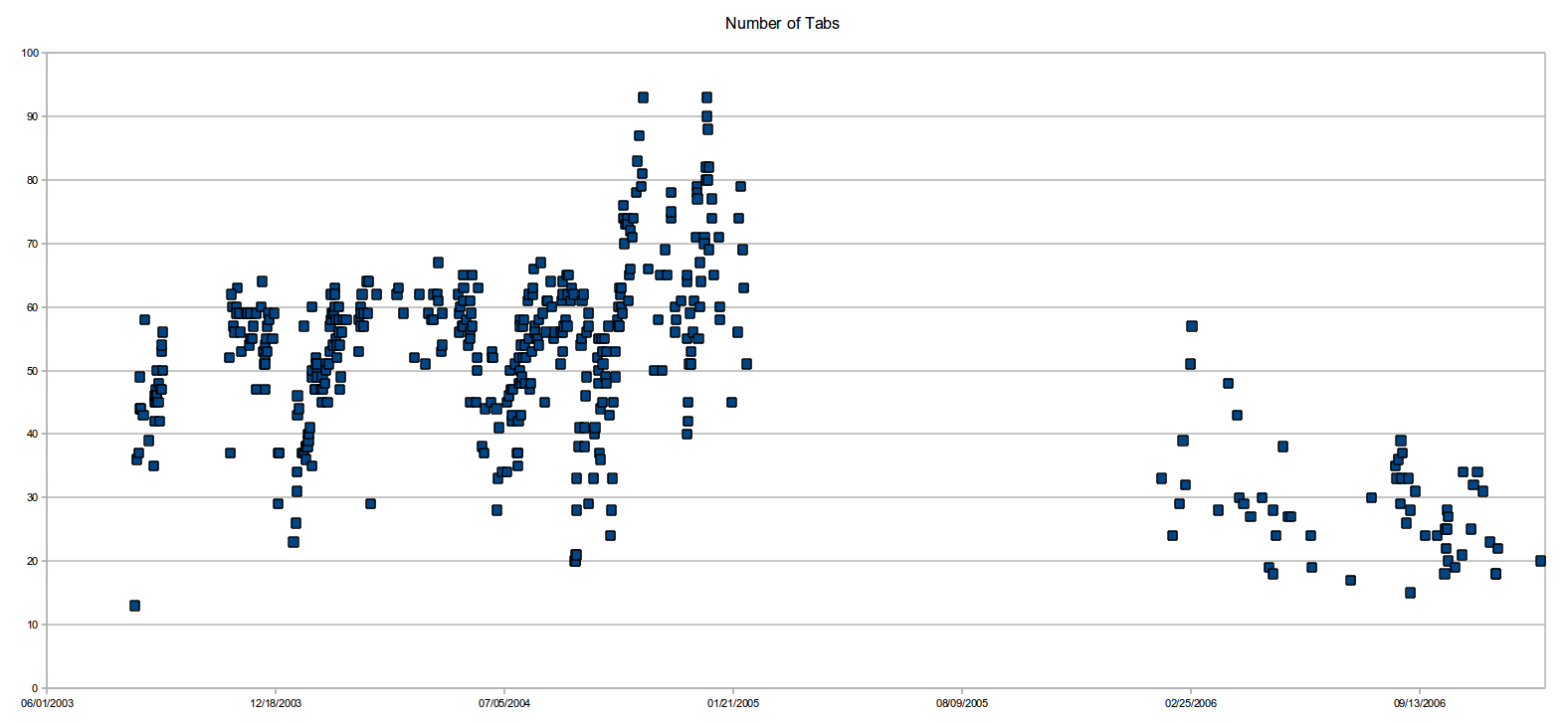
The default interface sucks once you have more than 50 tabs. I wish there were easy REPL-ish programmatic access to the list/dict of tabs (so I could filter out all GitHub tabs, or close all stackoverflow tabs, etc) and that was a first class citizen in the browser interface. This is one reason I’m really excited about the Nyxt browser.
PS: Part of it might be FOMO, but part of it is also that these links represent certain threads of thought/exploration and are like bookmarks of things to revisit at a later time. Yes, in principle I could export the list of tabs to a text file, and begin anew, but that’s not a fully satisfactory solution. I think we need tools & interfaces to better (more holistically) accommodate people’s intellectual workflows; what we have today is geared much more towards consumption.
As an example: why can’t we easily group tabs into projects and have bidirectional sync between the browser and project related resources (Eg: Some markdown/org file, or sync with Evernote/Notion/Roam, etc) so that whenever I resume working on the project, I get a warm start with the context mapped out (continuing from the previous session). And I want a much tighter relationship between my tabs and my project notes (akin to bibliography of references), including annotations on webpages, etc. If we are to use the web more effectively, the ecosystem surrounding browsers needs to grow up and help us get there.