It's a nice idea. I've recently been working with React more, and one of the things which can be frustrating is that it's often hard to find the right level of composability if you want to combine ready-made components. I.e. if you are looking for something like a spreadsheet as a component, maybe you find one with the correct behaviors, but it handles animations in a way you don't like. Or maybe you have to pick something non-optimal because it comes with the drag-and-drop handling you want. Or you have to build completely from scratch if you want to achieve exactly what you want.
In other words, it would be nice to have slices of UI behavior defined more orthogonally in a way which can be more freely layered, and it seems like this is a step in that direction.
From the developer perspective, I can certainly relate.
From the user perspective, yet another widget with subtly different behaviour is very annoying. I'd much rather you add drag and drop handling to the existing widget so that everyone benefits and UIs remain consistent.
Yeah I get this argument for native apps, but does it really make sense in the context of a React app? If I'm combining components from different authors, what's more important to the user is consistency between components in my application, not consistency for an individual component across different unrelated sites.
In the age of SPAs and Electron, can we really distinguish between "React apps" and "native apps"? The user doesn't care about the technical details - they just want a consistent UI throughout their computing experience.
<rant>
Hell, back in the 2000s, even web apps used native widgets, and we shamed websites that implemented their own UIs in Flash because they were bloated and inaccessible. Now we do it in Javascript and it's considered okay, even though all the same objections apply. And with Electron apps we've managed to combine all the worst aspects of web apps and native apps - they're slow, non-native and not cross-platform, and don't have text search, and still have to be installed.
In theory, but the developer still has to build it for each platform separately. Often they don't bother. It's not hard to find Windows-only Electron apps. This stands in contrast to webpages, which "just work" everywhere.
I was unable to create a Mac and Windows builds on Linux hist. Super annoying. Pretty sure it was just me, though. Can't imagine people have different build machines for each platform
There has to be a better way
I'd say they're both important. Yes, you want consistency within the UX. Of course.
But the users' expectations are set by their cumulative (read: across all apps) broader experience. If a high percentage of your users have a certain expectation for Interaction X and the app is not that (tho' consistent within the application) those users will likely be disappointed.
Of course some components + UX are truly unique. Perhaps the crux of your killer app / killer feature. Unfortunately, this is not as often as most ppl think; thus too much time is wasted making unique those things which are better off frictionless and forgettable.
React Aria is a great project! We used it to meet WCAG 2.1 level AA requirements in our chat widget. It's even hard to assess how many days of work we have saved thanks to this solution. We've covered a bit of our experience in multiple posts, e.g. with handling keyboard navigation: https://developers.livechat.com/updates/livechat-accessibili...).
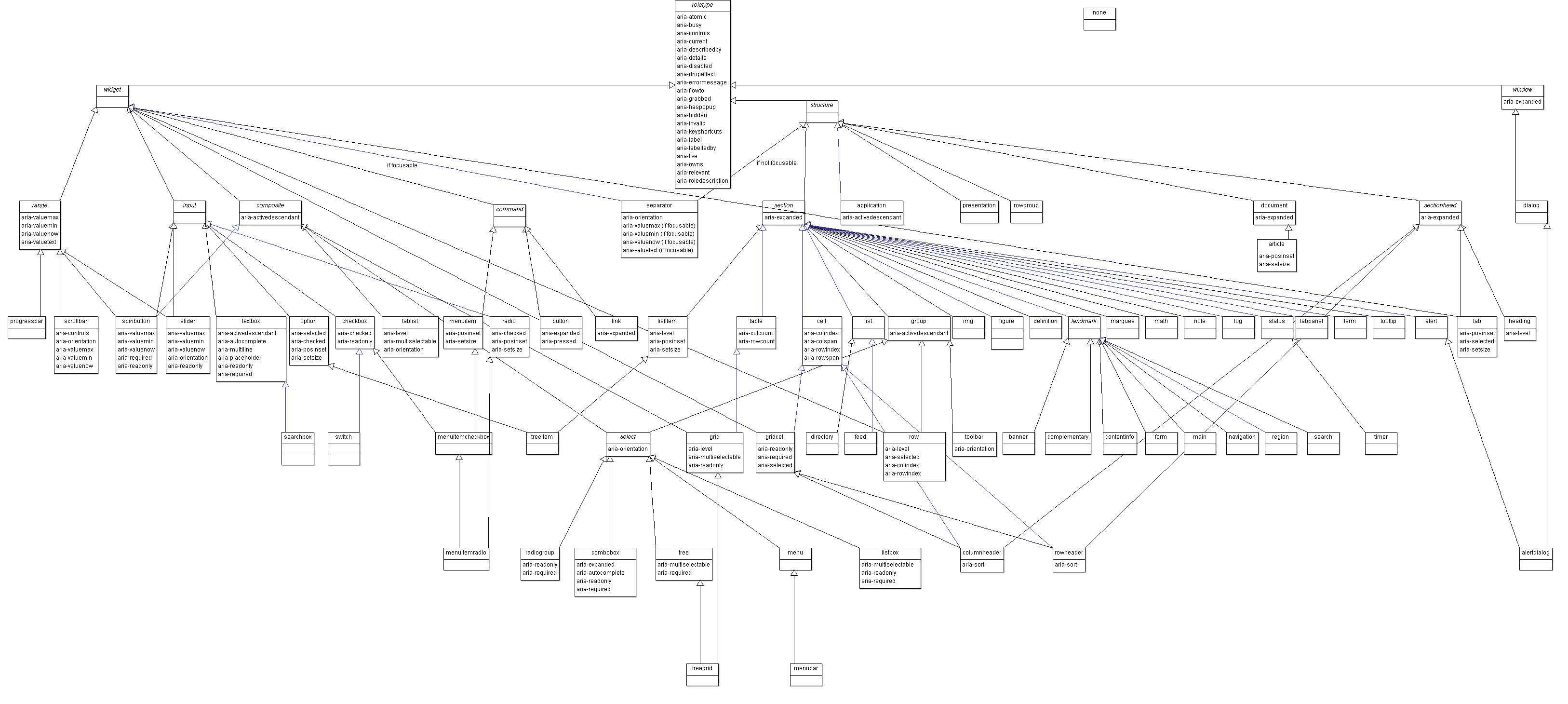
It is nice that Aria itself gets some attention, since Aria is quite unknown by many people despite its age. It isn't only blind or otherwise disabled people that would profit from controls and content being decently tagged and classified, even if that is the scope of it.
It is however quite extensive as you can see by the role definitions:
react-aria is awesome. You structure your DOM and css however you want, and react-aria provides hooks that return props to spread onto your elements to make them come alive. These same hooks also give you visibility into and control of the component state, so you can also easily blend in your own custom logic for the component. It is about as flexible as a headless ui library can get. But it's also lower level and so harder to use than, say, radix primitives.
I work on Plasmic (plasmic.app), a visual builder for React. With react-aria, we're able to let our users build, say, a Select component visually however they want, and then we just use the hooks to spread the right props to the right elements, and It Just Works. See https://youtu.be/mPHS2zg2a8Y
Headless UI is an exciting space. There's only so far you can go with re-skinning material ui or antd, and no one should be building their own from scratch. These headless libraries give you all the interactivity and accessibility you need for your components, but still give you total freedom over how they look. It is the way!
It doesn't come with any styling OOTB. The idea is that you're just building a frontend (all the markup, styling etc) around some provided state management
`react-table` is headless. I am forced to create my own html structure and am in control of the markup from the start. `headless-ui` provides those components which doesn't give me full control over markup, does it?
I've been using react-aria on a personal project, as well as building a UI library at work based on TailwindCSS+React Aria. I generally really like the combination.
The maintainers are super responsive+helpful on Github and really know how to engage constructively with criticism.
I really appreciate what they're doing. The combination of TailwindCSS+React Aria provides one with a pretty great template/scaffolding for building out a fully featured component library.
The only downside that I've found is that their typescript support can be a little weird in my experience, but their approach is nonetheless well considered imo. edit: https://github.com/adobe/react-spectrum/pull/1761#issuecomme... is a decent summary of what I'm referring.
First and foremost I like hooks libraries and think there should be more of them. That said when looking at their examples this appears to require exactly the same code you would need anyways, but with the additional boilerplate required by the library. Is the goal to add intellisense for people who don't already know how to write accessible front ends? Is the goal to enable me to use a div as a button via hook instead of writing semantic HTML? Not trying to be rude but honestly not seeing the value add outside maybe the FocusScope's restoreFocus and there is no way that works 100% as expected in the wild.
IMO the community is much better served by tools that help you identify accessibility gaps during the design phase, experience your application in other usage paradigms, or audit third party packages for accessibility before taking them as dependencies. If you work with designers who love hover triggered tooltips with forms with more tooltips inside them this library cannot fix the fact that you're making a terrible experience. If you want to npm install React-ported Kendo components because you "remember they worked well with jQuery" this library will not make them accessible. Turn voiceover on, turn your screen off, eat your own dog food.
What's worse "accessibility helper libraries" like this often get used as an excuse to say "of course we made this accessible look at all the helpers in the code" but the team never actually audits to see what the experience is like (hint: your Lighthouse accessibility score does not indicate WCAG compliance), and surprise surprise they've incorrectly implemented the helpers in a way that actually degrades the experience. Then they pay my agency a lot of money to hurry up and do it the right way before the NFB lawsuit drops.
react-aria is about more than just putting the aria-attributes in the right place. It also takes care of interactivity, keyboard accessibility, focus management, and smoothing over some crazy differences between browsers. Sure, it's all code that you can write yourself, but it's complicated and subtle to get right, and it's how we end up with all these half broken components on the web.
Headless UI is a great idea. As someone who was wrestling with different kinds of data tables, calendars, and rich text editors for a while, using headless UI libraries feels like a breeze.
I would love to hear from one of the Adobe team members about this. Are there separate React teams and WC teams? What’s that dynamic like? It feels like Photoshop on the web has been framed as ‘powered by web components’, rather than WCs being a minor detail. This post mentions “islands of React code” as if React is a legacy thing they have to put up with https://web.dev/ps-on-the-web/
I work on React Aria. Adobe is a big company and there are many teams using different technologies. In general, some very new parts of creative cloud chose to use web components, but the majority of teams are using React, and I don't foresee that changing anytime soon. It's definitely not a company wide shift if you got that impression from the Photoshop article. Ideally we'd collaborate more, but... big company silos.
I can see the appeal of web components when your interop issues are as large Adobe’s must be. On the other hand if huge portions of your apps are canvas / wasm then web components’ DOM-centric component model might feel awkward or constraining
"Bring your own UI". You get the behavior from the library but they are completely unstyled or without the component layer where the styles live. Other libraries include Radix and HeadlessUI. Here's a presentation from one of the Radix library authors about how to build dropdowns in React, it serves as a good explainer about what goes into a headless UI library component. https://www.youtube.com/watch?v=lY-RQjWeweo
They’re pretty lacking. <select> is a great example: no searching/filtering, no ability to have styled/multiline text in <option>s, nor anything that’s not plain text (so no SVG iconography for example).
People constantly have to reinvent the wheel to offer fairly basic functionality, so it’s good that there are libraries to handle the behaviour and accessibility side well while supporting whatever visual styles you want to make.
I feel like a big problem here is that the Getting Started starts with a bunch of code that just... outputs a bare button. Starting with something like a combobox would show much more value.
'headless' means you bring your own html structure, the library provides interaction and state exposed by props or hooks. As such, I am not sure Headless UI is headless since they only let you bring your own CSS. At that point, it's a lot easier to create your own set of components that you have full control over than to include another NPM dependency.
It's not a thing, this is just a term made up on the spot by the author of this article to describe a component library that has no built-in style.
"What does it even do then" you ask. It implements basic accessibility patterns so you only deal with high level UI elements and not have to worry about having the correct `role-` or `aria-` attributes. That and composite elements such as tabs or modals
Why no style? Most product teams have a design system and they actually overwrite the style of component libraries anyway. So better to have component libraries without style, less bloat.
HeadlessUI is one of the newcomers, with a lot of name recognition due to its affiliation with the wildly popular library Tailwind. The term has been around much longer. The first commit of the awesome list was over 3 years ago, and I suspect the term was already fairly established at that point: https://github.com/jxom/awesome-react-headless-components/co...
The never ending battle between customizability and uniqueness.
If there were a standard library (adopted by all browsers) similar to the default look of iOS and Android apps, but in return you couldn't customize the look, would y'all go with that?
I hope its appreciated. My mum used a Windows laptop and the apps were like a toystore. I got her a Macbook and the same apps looked uniform and they obeyed the accessibility settings perfectly.
I suspect many people would use that for the functionality that it provided, but web standards are always going to move slower than individual developers and UI trends, and that’s good! Imagine if we had to wait for web standards to develop a road map element.
Just that it won't look the same across different browsers and platforms. They will also work differently, have slightly different options, and not every element will be available everywhere anyway.
I haven't gotten into react yet, but am looking at a new project where it might be useful. Out of curiosity, are there drop-in compatible replacements for the standard React libraries, like maybe Preact?
My advice - start with Next.js. Only got started with React myself a year ago (and love it) and to be gone it’s I though, I’ll just stick to nice simple react I bet I don’t need the other stuff. And then, I gradually realised why people use all this other stuff. Next.js solves so many problems!
Not interested in the server-side stuff as I don't use JS/Node on the backend. I see that Next.js is a Node framework, so unless there's a cut down client-side only version that's useful, not sure it'll fit the bill.
I was looking at Alpine.js but it's pretty minimal, so I want something more full-featured to compare to. These headless UIs look useful, and some have React and Vue versions.
While it's true that it's a Node framework, NextJS can totally function like a client-side React framework. NextJS just bakes a lot of basic and common functionality such as routing, built-in support for CSS modules, as well as optimizations (it's not premature if it's baked in already).
The server-side mostly just takes place if you utilize the following:
- Built-in API
- Server-side Rendering
> Not interested in the server-side stuff as I don't use JS/Node on the backend. I see that Next.js is a Node framework, so unless there's a cut down client-side only version that's useful, not sure it'll fit the bill.
NextJS (and Gatsby) occupy this space between a static site and a site that is sever rendered. While the site itself is static, during the build process is when all the "server side" stuff happens.
don't be so fast to dismiss needing 'server side stuff'
one pitfall of react that it fixed for me was escaping the single page gracefully.
for example, if you want to have any other /pages that can be shared properly on facebook / get index on a search engine, then you NEED to render that on the server (can be statically generated with next.js so you still don't need a server)
doing routing with pure react is a complete headache and mess of code, plus it will not get indexed properly / look right on a search engine.
if you start with next.js, you lose none of the react functionality, add very little overhead, and can actually make a functioning website a lot more easily.
like i said, i rejected it to begin with too - but it is super useful and super easy to use. don't make my mistakes all over again!
Next.js has `next export` which generates a client-side only bundle. It's really neat, as it saves you a lot of manual setting up and maintenance of configuration files, assuming your app fits in the boundaries of Next.js's use cases - which most do.
Preact is a drop in replacement as long as you use the "compat" package. If you use a framework like Gatsby or NextJS, they both have a plugin that lets you drop in preact (positive that Gatsby has this, pretty sure that NextJS has the same)
What would I use a headless UI on top of my css styling when Chakra UI already follows WAI-ARIA standards for every component and it gives me all the freedom of customizing my css inline?
For some components, like a button, overriding some css may be all you need. But other components can be more "opinionated" - for example, for a Slider component, do you want to label your thumb value? Does it go on the side of the slider or on top? Maybe even embedded into the slider track itself? Is it only visible when you're dragging or always there? What if there are multiple thumbs? Etc.
Some libraries will offer a ton of props to customize different parts of a component - and for some use cases, that is enough. But sometimes it is just easier to structure and style the component however you want, with custom behavior sprinkled in, and then letting a library like react-aria take care of the rest.
Isn't the point of an UI to have an ... UI after all? The only ones that I can see being headless here are customers buying in to headless UIs, headless CMSs quackery.


In other words, it would be nice to have slices of UI behavior defined more orthogonally in a way which can be more freely layered, and it seems like this is a step in that direction.