I'm not surprised they made an exception. Something cute and cheerful like this might go a little way toward improving people's notch-related dispositions, and in any case it is cute and cheerful so why not?
Considering how little good software (or any software at all) is available on the Mac App Store, I would think Apple would be happy to accept mostly anything
It's funny how much of big deal the notch was when the new Macs came out, but after using my MBP for a month+, I never (and I mean never) even notice it or get bothered by it.
I played with the new models in a store today for the first time and I was surprised that even in a couple of minutes that it wasn't noticeable. Probably iPhone induced notch blindness.
What was noticeable was how nice the new body shape is.
I get this. When I was a teen we used computer screens with all kinds of defects, cracks, discolored patches, part of the screen getting cut off etc. Not ideal, but we got used to it quickly.
It's not noticeable in full screen because the menu area becomes black, such that there's no notch standing out.
I see it as extra screen space for the menu, clock and taskbar.
Movies are letterboxed on a 16x10.4 screen anyway, and games could easily be letterboxed or not— most games have their critical HMI elements inset somewhat from the edges of the screen anyway because of TV overscan.
Notches are fine, but hole-punch cameras are truly fantastic. You're really getting extra real-estate instead of a divided sector at the top of your screen. I anticipate you're going to love it when the iPhone gets one in... 2024?
I am not exaggerating that I didn’t notice the notch at all until about an hour into using a new MacBook Pro. I thought I would be bothered by the “fat” menu bar but in reality I spend very little time looking at the menu bar and they do a good job minimizing it with dark backgrounds. (I rarely use full screen mode, where it is much more obvious.)
Maybe then I suggest installing notches right, left and at the bottom of the screen. I am pretty sure you will never (and I mean never( even notice them or get bothered by them. :)
> And for those of you without a new MacBook Pro, Notchmeister also includes a genuine replacement notch. Be warned that side effects of this feature include making you want a new Mac even more than you already do. Sorry.
So nobody in this discussion (nor the site) explains what "notch" means, in context.
---
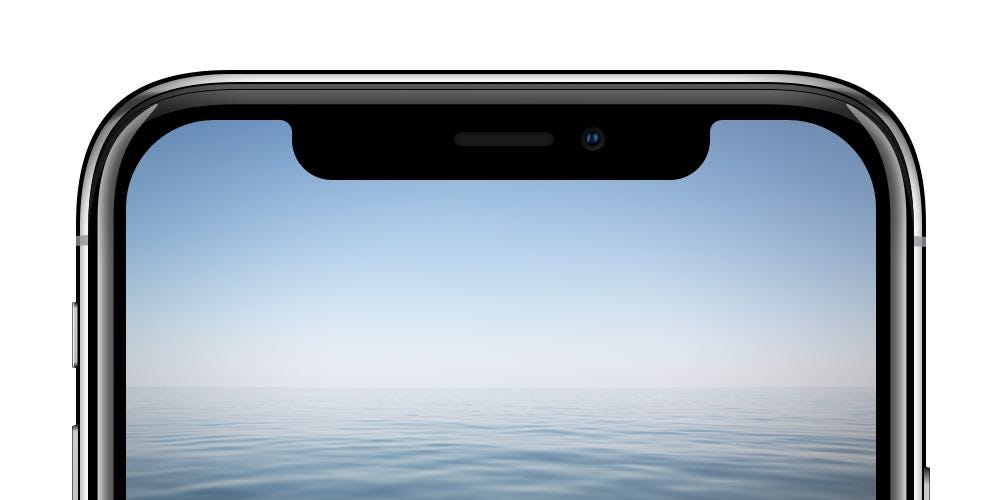
It's a black box on the top part of the screen that houses the front-facing camera and other sensors. The notch easily distinguishes the iPhone X from its older cousins and is considered part of the overall good design.
At the top of your MacBook Pro, yes. They added a notch to those too, in the most recent iteration. It has not gone entirely without entirely predictable controversy.
I unironically love the "Glow" effect. It's subtly helpful for relocating my hidden cursor and maintaining spatial continuance. I would love something similar but perhaps allowing to adjust the color or intensity. Or maybe adding an option when video is playing so that I can hide my cursor behind the notch if I want to.
The screen is sized such that the area below the notch is the standard 16x10 macs have used for a long time. You can think of it as having the same displays we’ve always had. In contexts where the active application knows how to deal with the notch, it basically operates as if you’ve reclaimed some of the space in the top bezel. When the active application doesn’t know how to deal with it (full screen apps that don’t declare they’re willing to deal with the notch), the top just stays dark and you have a regular-sized bezel.
The display has really good contrast, and you wouldn’t be able to tell it’s not just the bezel. I legitimately can barely see it even when I’m trying to.
Yea, it's a 16x10.4 display. If you're watching 16x9 content, it didn't stretch vertically on old Macs that were 16x10 either. On this screen, it just doesn't come close to the notch. If you're doing full-screen with something that doesn't have a Mac menu bar, it just uses the display area under the notch so you don't see any notch.
I like that they basically put the menu bar and the webcam in the same space. It means I have more vertical space for the rest of my stuff. Is it perfect? I'd love a camera that could be invisibly embedded under a display and still work perfectly, but I'd also love to be able to teleport. It seems like a good engineering compromise to make something that works well. Really, the new MacBook Pros are just amazing in ways I'd resigned myself to putting up with Apple being annoying. No more touch-bar, giant escape key, emoji key, ports, and not trying to shave every tiny bit of weight/size when doing so would compromise usability. They even went with a 20% larger battery for the 14" and the 12% sharper display isn't transformative, but it's a nice upgrade.
The notch is a good use of otherwise wasted space, at least for me.
The un-notched (and un-rounded) portion of the screen has the same dimensions as the previous screen, so the notch is only taken out of additional pixels added to the top. In practice, it's more of a dedicated menu bar area than part of the regular screen (it just goes black if there's no menu bar to display).
I dislike the notch as much as the next guy, but they started with a 16:10 display and actually ADDED pixels on top around the camera. In this case, you're not losing ANY pixels due to the notch. Videos should play just fine given that most are 16:9 or wider.
You're not really gaining them either. In full screen, apps are basically the same as they were previously since the top notch bar becomes blacked out. In regular mode, they've increased the vertical height of the menu bar to match the notch, so there's what, a handful of pixels gained there?
This has been my experience. Really the notch is far less distracting than I thought it would be. I think the one thing that bothers me the most about it is that they made the menu bar slightly bigger so it is visible under the bottom of the notch rather than perfectly aligning to it. Still not as annoying as the garbage palm rejection.
Not for a Mac yet, but I just got a phone with a notch for the first time a few months ago, and I actually find myself frequently using VLC's option to expand the video into the notch area. That near the edge of most frames, there's rarely anything of import to risk concealing, and there's something enjoyably Star Trek about watching a video on a round-cornered handheld display.