> Why does this cable have all 24 pins when only half of them are connected? The extra pins could help the plug sit more securely in its socket. Another guess: the same factory makes Thunderbolt cables, and it’s cheaper to maintain just one design, even though that means wasted material and effort.
The highest volume manufacturers may be fully integrated. Usually how it works, especially for these relatively low volume no-name brands, is they buy connectors from one vendor, PCBs from another, cables from another, plastic moldings from another, and then assemble them together (which may also be subcontracted). The assembly process doesn't have to be sophisticated: a small warehouse with a few workers with soldering irons and some jigs. Even some medium-volume assemblies like the USB-C front panel cables for major computer case brands are soldered by hand by a handful of workers in a small building.
Almost all of the USB-C connectors which are available off the shelf have all of their pins populated. Pins are very cheap. You need to be moving a whole lot of volume before it makes sense to go to your connector manufacturer and ask for a custom one with missing pins.
Soldering small stuff can sometimes be easier, because at that level surface tension will do the job for you. So hand soldering 14 pins on a small size TSSOP package can be faster than soldering a SOIC (through hole) package (google drag soldering — just be careful with that in certain parts of the US \s)
The hardest part with cables is to prepare the strands and keep them in place. For this you can build fixtures.
There's a pretty decent chance it is a mix of both.
USB-C connectors with pre-attached PCBs ("paddle cards") are widely available[0], and are created by a machine. Aligning the cables with the paddle card is quite tricky to automate, so humans are still used for that.
Probably not, at least not in the way most people think of hand-soldered. There are hybrids where a human drives the soldering iron electronically rather than holding it in their hands, although even this the rate of defects would be so high it would make it impractical at even a small scale.
Typically you have a stencil that you squeeze the solder paste through and then you put the IC on top with a tweezer and bake the whole thing with something like a hair drier. It's not that difficult to get good results without using an expensive pick&place robot.
I have one from the kickstarter, and every new USB-C cable gets tested and labeled. Most are USB 2.0. A few will have the power delivery pins. It's such a crapshoot on any shopping site.
It should be mandatory that these cables are correctly spec'd and labeled.
Maybe I'm just stupid but I want one of these that just prints out (or lights up next to text) something like:
    5w
    10w
    15w
    20w
    ...
and
    480mbps
    5gbps
    10gbps
    20gbps
    40gbps
and maybe
    USB2
    USB3.0
    USB3.1
    USB3.2 gen 1
    USB3.2 gen 2
    Thunderbolt 3
    Thunderbolt 4
Or something like that. At least once I month I go searching for USB cable testers for this exact purpose and within 10min my eyes are crossed and I just close all the tabs giving up.
I think I recall the designer of the tester I got was unable to reliably ascertain the different types of cable, so pin testing was the next best thing. I agree, it would be great to have a smarter cable tester.
Unfortunately it doesn't check for the last piece of the puzzle - the USB-C cable e-marker which has to be present to signal advanced capabilities for charging and thunderbolt. So it's not sufficient to test for high performance cables :/
I actually have a POWER-Z tester (the KM003C) and it can read the eMarker (yay), but it doesn't actually test the cable pins (boo). So it'll tell me if a cable is capable of charging the laptop at 100W, but it won't tell me if data lines are all fine and if it reports thunderbolt capability.
It's pretty much useful for testing charging, but not use for e.g. eGPUs. :/
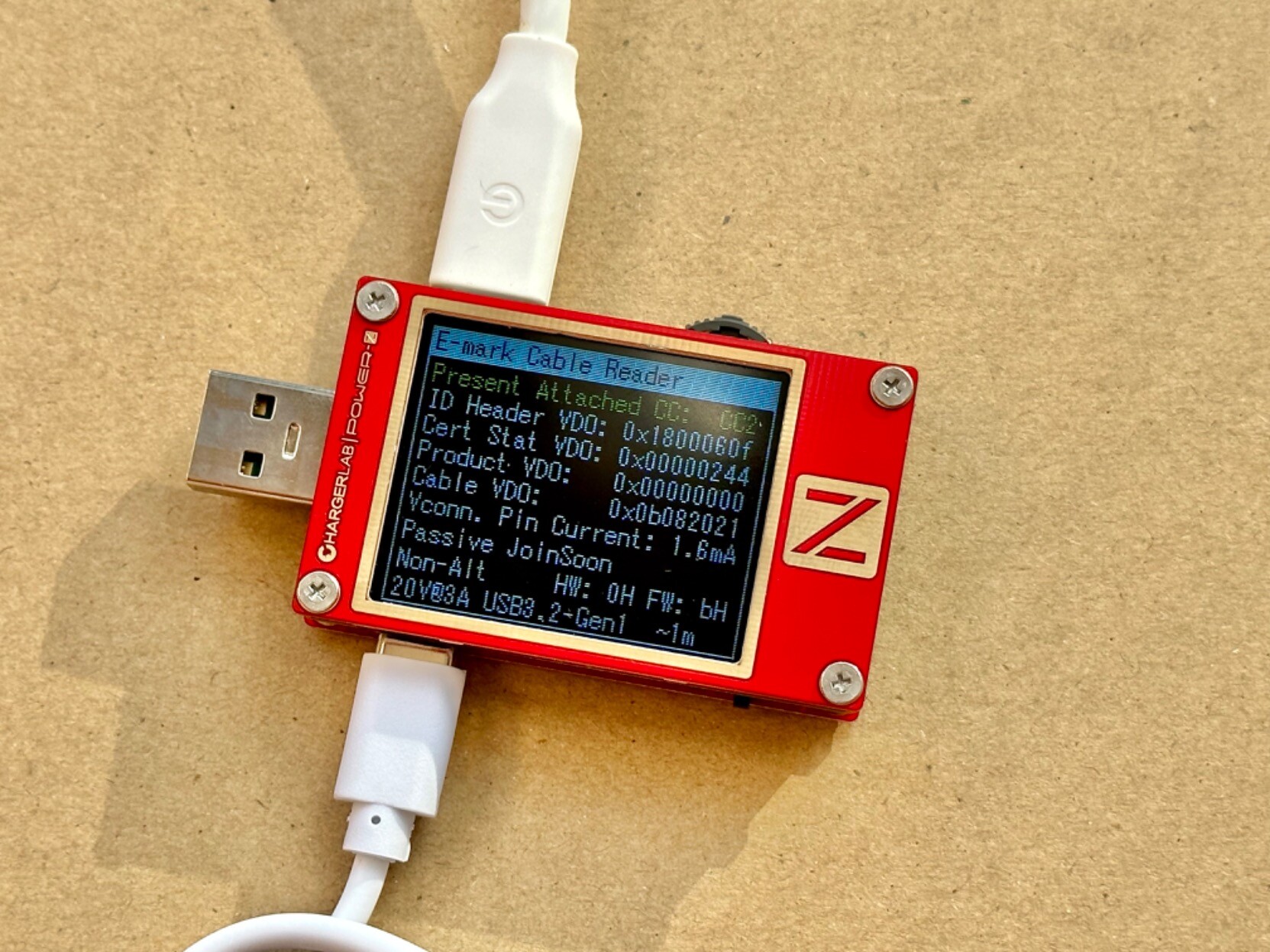
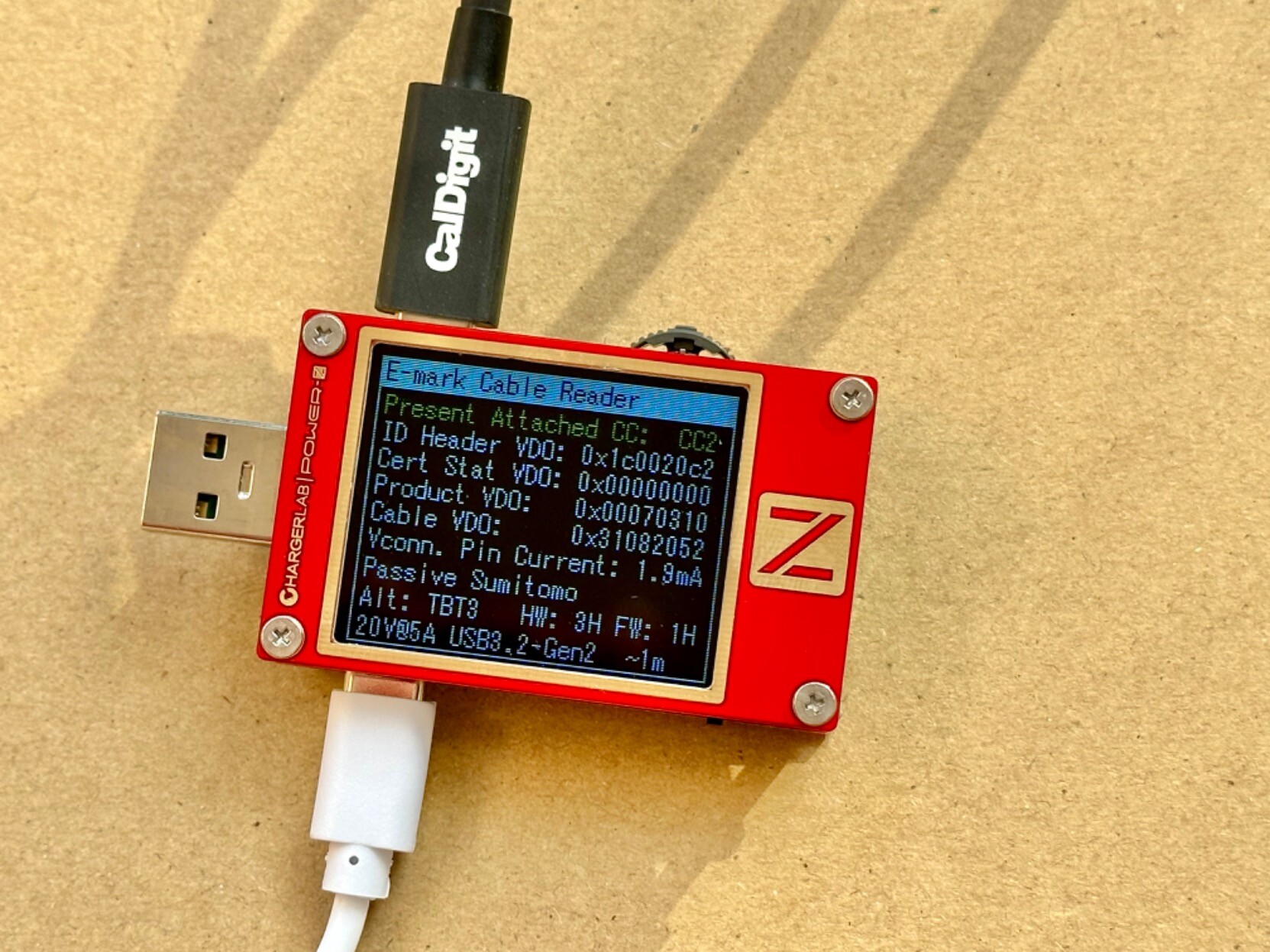
I have the KT002, and while it doesn't specifically test all the pins, the E-Marker data readout does contain if it declares Thunderbolt 3, USB 3.2 Gen1, etc compatibility[0].
And I have yet to see a cable that bothers to have a E-marker like that that then doesn't actually have the pins connected. I suspect if the e-marker lies then rather than just dropping down to a lower spec the cable will just outright fail
"USB-IF strongly discourages its members and the industry at-large from using specification names/terminology in
consumer-facing branding, packaging, advertisements, and other marketing materials."
They recommend the following naming:
XYZ's USB 40Gbps 60W USB Type-C® Cable or USB 40Gbps 60W USB Type-C® Cable
USB 40Gbps... correspond to the USB4 Gen 3×2 mode
Hi-Speed USB is USB 2.0 (High-Speed).
A tip usb cable and a number in the logo = not USB2. A usb c cable and black/white in the logo = not USB2
Sometimes the marketing name and a logo specify a certain mode like
USB 10Gbps the marketing name is only used for USB 3.2 Gen 2×1 mode, the black/white logo with 10 Gbps always correspond to USB 3.2 Gen 2×1 mode.
If you see USB in blue and 10 Gbps in red than it's either USB 3.2 Gen 2x1 or USB4 Gen 2×1
( those modes have different encodings )
What a clusterfuck of branding. The inability to easily differentiate between capabilities makes everything the same as the lowest common denominator - the shittiest USB-C cable from wish.
I wish all smartphones would be able to tell you the capabilities of the wires you're using. You can't expect consumers to order weird devices from China just to know which wire to freaking use with their phones.
Yeah, that was actually quite helpful (when properly implemented). Especially in era of laptops that had a mixture, you knew to plug in the portable drive into blue not the black USB port (and put your phone to charge into yellow one:).
I think your tester would actually break that active Apple cable (because an active cable essentially behaves as a "device" since it has active circuitry on the high-speed lines.)
You’re getting a lot of “hot take” and sarcastic responses, but the actual answer is that they do. To use any of the USB-IF logos (including the official ones that clarify power and signal compatibility) a product has to go through the certification process: https://www.usb.org/logo-license
The question then is, “Why is this still confusing?”. The answer is probably that the popular retail and e-commerce channels are flooded with products that aren’t certified, and consumers don’t realize that a certification process even exists.
I've bought some supposedly USB-IF certified cables a couple of weeks ago and I didn't notice the logos. When I get home tonight, I'm going to take a closer look.
Why stop a labeling? You could design the connectors to only terminate at another connector that supports the same features, preventing anyone from confusing one cable for another.
And the reason we don't do that is because it would expose the lie that there can be a universal data and power connector for all devices, and rather than live in a world where everything can connect perfectly fine with the right cables, we have chosen to live in one where the market can be flooded with garbage cables that don't work for your devices. And rather than blame the device manufacturer for choosing a shoddy cable, or the government for forcing them to, we can happily blame the cable manufacturer instead.
If you just slap a label on it, it's not going to fix the problem. No one is going to read them, and people are going to lie.
I understand its a bit of a hot take but I just fundamentally disagree with the premise that we should be using one connector for such a wide range of devices. It's a recipe for garbage.
Considering most people that encounter USB cables these days is for the purposes of charging some device, and a smaller minority will actually care about optimizing the charging speed, the universal connector solves a lot of the important usability problems even if it creates other kind of problems. Engineering is about trade offs and while separate connectors might make you personally happy, it would probably result in more expensive devices and cables that have even worse interop (the more generic the hw can be, the cheaper it is at scale).
I think the logos would be helpful but I doubt anything will happen in that direction because the benefit is likely marginal.
> And the reason we don't do that is because it would expose the lie that there can be a universal data and power connector for all devices
And yet, such a connector and cable does exist!
> everything can connect perfectly fine with the right cables
Right, because carrying 3 different cables to give a presentation, which I wont be able to if I forget one of them, or it gets too bent in my backpack is indeed "perfectly fine". As opposed to carrying just 1 USB-C cable (which as a bonus I can use to charge my Android phone in case the battery unexpectedly starts running out before the end of the day) and even if it gets damaged or broken, odds are increasingly that there will be several other people who will also have that cable.
> rather than blame the device manufacturer for choosing a shoddy cable, or the government for forcing them to, we can happily blame the cable manufacturer instead
And we can't do that with universal cables because?
There used to be a thing where cables that supported usb-3 had blue interiors to their connectors. But then some jackasses started shipping crap cables with blue connectors at inflated prices...
I don't think the usb standards body can realisticly police the labeling in any real way.
Isn’t that how we got USB 3 Gen 2 PD 130w Muffin-Spec?
Their names are terrible.
Besides. If companies are going to make non-conforming cables, they can put fake labels on them too. No normal person is going to check for the right labels.
They need a “USB C 4 cable”. They type that into Amazon and buy the thing with a low price and 4 stars.
The exact markings on the cable don’t make a difference.
You can probably blame the manufacturers and tech press for that.
These were always only intended to be internal designations for very specific technologies, with the devices and cables simply labeled with their actual capabilities. None of the Gen1/Gen2/Gen3 nonsense, simply "10G" / "20G" / "40G".
Unfortunately not everyone got that memo, and once the general population got used to the complicated internal-only designation it became pretty much impossible to use any other term for it.
I have the FNB-58 which says has a 24 pin interface but that might not necessarily mean that it tests all of them! I should probably test it. It's a bit pricy but very well built, and pretty stable as long as you update the firmware or get one with a newer version already installed.
Hahahahaha yes I realized it was a bit stupid as I was writing it.They only mention having 24pin interfaces, not testing though I don't see how they could do one without the other, or how it would support 120w passthrough without those pins being connected! But it's AliExpress! One of my favorite online stores, but you absolutely have to always double check what you buy.
Still, more trustworthy than buying more niche electronics from Amazon imo.
It does meter the power being used though. It logs power usage and can measure resistance. You are 100% right that actual cable testers are much more capable but wouldn't that be enough to know if the cable can handle the wattage that it advertises? Wouldn't a bad cable have high resistance, or missing emarker tags (they can lie about this though) ?
For data transfer that wouldn't be a good metric though, so again you are right!
Well, it's definitely very useful device and it also seems to have cable resistance which is rare in this. I had some other FNRSI devices and they generally feel pretty solid, if UI/UX crippled a bit.
And maybe it won't just stop working like the one I bought did...
Which makes me sad because it was somewhat of an unique product because outside of the "chinese USB tester functions" (paging thru what negotiation succeeded and monitored voltage) it also had little buck-boost converter so I could use it as power supply (for example connect to bog standard 5V USB and boost it to 12V or current limit it).
I completely agree. For example I made the mistake of buying their multimeter and its completely trash, their usb tester is fine but only if you know it's quirks and update the firmware. When I got it originally it had a weird bootloop issue. They have interesting products but they definitely aren't as reliable as some of the bullet proof and oddly reliable Chinese manufacturers on AE. To be fair, their support was top notch
(Sidenote, this pattern is so common with AliExpress: very very good hardware but janky software. But God do I like the hardware since it seems like even the most niche, non mainstream stuff still see steady innovation and improvement. None of that 10 year old hardware that used to be common for almost all hobby tier niches haha.)
The scans and analysis were cool, but comparing one quality cable from Apple to one budget offering from Amazon and two e-waste options from completely unknown brands isn't enough to answer the leading question "Does Apple’s Thunderbolt 4 cable really warrant its $129 price tag?" Especially considering none of those cables even advertised feature parity with Apple's cable.
Speaking of USB-C 10 Gbit/s cables, I've noticed something odd about the iPhone 15 Pro:
I have a USB-C cable that has been yielding 10 Gbit/s speeds (i.e. USB 3 Gen 2x1 or possibly but very unlikely 1x2) when used at my Mac with various devices (mostly SSDs).
However, that same cable only gets USB 2 speeds when connecting the iPhone to my Mac. The iPhone itself also seems to only get USB 2 speeds using the SSD and that cable. Yet with another, newer USB-C 10 Gbit/s cable, I get 10 Gbit/s throughout all scenarios.
What's going on here? Is the iPhone overly strict about supporting USB 3 speeds over USB-C cables, i.e. is my old cable possibly not electronically marked properly, and the Mac is just more tolerant of that?
And something else I've noticed: The iPhone also does not get 10 Gbit/s using a somewhat monstrous adapter construction (USB-C to USB-A adapter, USB-A to USB-C cable) that should however be fully standards-compliant without any active e-markers (i.e. a resistor-marked A-to-C cable and a resistor-marked C-to-A adapter).
I really wish there was an easy way to dump the cable's SOP' communication on macOS and look into whether a given cable is actually e-marked, and if so, with what capabilities. Alternatively, just showing this in "System Information" would really help, i.e. indicating whether a connection is only using USB 2 speeds due to the cable or the device not supporting more.
Your article says USB A male to USB C female is noncompliant.
It doesnt say USB A female to USB C male is noncompliant. These are reasonably common and I had one included with both my current laptop and my current smartphone, for example.
Yes, I meant female A to male C. These are compliant and even have specific resistor coding so that dual-role USB-C devices know what they have to do, since USB-A ports are directional.
I think a good step in debugging this would be to download Apple’s “Additional Tools for Xcode 15”, and then open up IO Registry Explorer. There’s a lot more info to see there about attached devices than the standard system profiler.
There are already some SOP-related messages in the system debug logs (although almost completely redacted), so I'm at least optimistic that this is handled by the OS, and not e.g. purely in firmware in the USB-C controller.
Both my current M1 Mac and my previous Intel Mac were fine with the cable!
> It would be interesting to know of a high quality cable tester showed some other difference in capabilities between the cables that may explain it.
I'm fairly certain that the cable itself is perfectly fine, but that the iPhone insists on a specific bit being set on the e-marker chip insider the cable, while Macs are more tolerant and will just attempt a USB 3 connection anyway, especially since they need to support unmarked USB 3 for use with USB-A adapters anyway.
I figure the reason the Apple USB-C cable has a complex PCB embedded in the head-end of the cable is to detect Apple-certified devices and ensure top speed only when paired with an Apple-certified cable. Both the device and the cable have to recognize each other as properly licensed devices, otherwise you get sub-standard performance.
> The USB-C cable that comes with your iPhone supports charging and USB 2 speeds. If you want to use a USB 3 device, use a compliant USB 3 cable that supports 10Gbit/s.
Note that this is only the 15 Pro. The "vanilla" 15 uses last year's A16 SoC and doesn't have a USB 3.x-capable PHY.
Doing 40Gbps data is really hard because physics. Once you get beyond about 100cm, the signal loss basically requires you to add a repeater or retimer. This has been part of the USB-C specification since the very beginning, and any cable of this length doing 40Gbps will feature a similar PCB.
Sure, but I'm trying to do 10 Gbit/s on a <1m cable. That's definitely possible passively.
The USB specs say that C-to-C cables need an e-marker for that, and A-to-B or other non-C-to-C cables need nothing at all (apart from one or two resistors in case of an A-to-C or C-to-micro-B adapter).
Anker, Cable Matters, Spigen, Satechi, Belkin, CalDigit, StarTech.com, OWC, Wavlink, UGreen, or literally any brand anyone has ever heard of would be nice.
Personally it's become my hobby to read out amazon product titles to annoy my partner and/or coworkers.
Even brands I trust more so do this awful keyword stuffing, example: the first result on my amazon for "USB-C":
> Anker USB C Charger Cable (6ft 100W, 2Pack), USB 2.0 Type C Fast Charging Cable for iPhone 15 / 15Pro / 15Plus / 15ProMax MacBook Pro 2020, iPad Pro 2020, iPad Air 4, Samsung Galaxy S23+/S23 Ultra
It's not quite as egregious as some of the titles that use broken english but it's something...
I used to have a Soniq brand TV. To emphasise the stupidity of the name I insisted on pronouncing it not as "sonic" but with the final q as the weird sound which begins "quack".
I try to find the humor that our global manufacturing is so absolutely broken and encouraged by our politicians that Chinese crapware makers don't need to do anything but slam the keyboard for their "company name"... And the world lines up to buy it.
From what I understand, the gibberish name trend started with Amazon requiring a unique trademark for at least some product sales. You can see the perverse incentive results.
Are you worried about the internet paper that will be wasted and the digital trees that will be cut down if they post a follow up in a second blog post?
Not sure what you mean but instead of taking the site for what it is, just a demo of a scanning device you instead expect a serious review of USB cables which they are clearly not in the business for.
> Apple’s new iPhone 15 marks a disruptive departure from previous models. The 11-year reign of the Lightning cable is over, and the USB-C era has begun — leaving us wondering what sets one charger apart from another.
> Does Apple’s Thunderbolt 4 cable really warrant its $129 price tag? Or does a $5 cable get the job done just as well? We’ve used our Neptune industrial X-ray CT scanner to uncover the hidden engineering differences between them.
It fails doing that.
PS. my comment said that your previous comment didn't have anything to do with the topic and instead tried to judge me and my feelings.
My guess is they don't want to bite the hand that feeds them. Seems like the products they sell would be very useful to said companies. Wouldn't want to air any of their dirty laundry, it's PR not a reporting/review perspective.
“ Another curiosity hidden in the circuit board is this wiggle on one of the traces. It contains a tiny detour to make sure it’s the same length as its paired trace, which is especially important when dealing with extra-high-speed data transmission.”
A wiggle that small is adding picosecond delays. I’m surprised that’s necessary. Cool!
My (deeply uninformed) guess is that it probably wasn't absolutely necessary, but would be one among a hundred tiny details which improves resilience. There was space for it. And it has a $0.00 unit cost. It'd be more surprising if they didn't do it.
For Apple, perhaps the most economically exposed to customer problems of any major tech company, and has enough scar tissue from past failures, it's not surprising that their products tend to feature first class electrical engineering. Their DC chargers are widely regarded as among the best in the industry.
There's not much to it. You route them without worrying about equal length, and then your EDA tool adds serpentine tracks to the shorter one to match its length to the longer one.
In my experience having bought cheap, middle of the road, and high end USB-C cables and adaptors, Apple's have been the only ones that have lasted me more than a year.
You could get a 1m Belkin Thunderbolt 4 cable for about $40. Afaik Intel controls/certifies Thunderbolt cables and Apple just has free use of name or something.
So should any Thunderbolt branded cable have similar performance and build quality to the Apple cable, then? Cause I wanted to know the same thing - I came away honestly impressed and thinking maybe I should buy an Apple cable even though I don't own an iPhone. But the real question is whether other vendors have the same quality at a lower price point, because I don't feel the desire to pay the Apple price if they aren't better than the competition.
I cant speak to the build quality of Thunderbolt cables made by manufacturers other than belkin or the one Apple sells - both of which have been great. The belkin cable feels a slightly more rigid. As far as Thunderbolt branded cables you can expect to get the speeds and power delivery that’s advertised, just pick the cable that’s right for you. The one I mentioned earlier is certified for up to 40Gbps and 100W power delivery.
I haven't tested the theory yet, but I do need a longer USB-C cable, the recommandation I heard was that even if you just need a USB-C cable, go buy a Thunderbolt cable, because they you'll be sure that it will also work for all USB-C use cases.
Having used many TB3/4 cables recently I can say that if it's Thunderbolt certified and from one of the larger industry players you would probably be fine
Sounds great until you realize some people have "I need to charge my phone 15ft from an outlet" needs, and other people have "I need 40GBPS which needs a dual side populated 9 layer (wtf?) PCB with blind and buried vias, extremely small components" needs.
USB-C the idea was great. The execution has been so stupid.
It's true that there are many high quality USB-C cables, but they are utterly swamped by an order of magnitude more low quality USB-C cables. A particularly tech savvy person might be able to wade through the muck, but most normal people won't even know to.
It’s most likely 9-layers because that what you need to correctly route the traces from one set of 12 pins, to the other set of 12 pins (to make up the 24 total in USB-C), which is needed to make the connector fully reversible. There will also be a e-mark chip in there that tells any connected device what the cable is capable of doing, so you don’t accidentally send 240w down a cable only capable of carrying 100w.
9 layers might sounds like a lot. But reversible connectors are a bit of a logistical nightmare from a PCB routing perspective. Made even more complicated by the very tight signalling requirements needed to hit Thunderbolt 4 transfer speeds. The end result is what looks like a significant over-engineering, but is really just an expression of how difficult it is to transport high data rate signals around PCBs and cables.
Only 2 data pins per side are reversible that way, and it's the low speed ones.
The high speed pins (4 per side) should be going directly into a multiplexer or driver, the CC pins (1 per side) detect orientation, the sideband pins (1 per side) are only used dual-sided, and the power and ground pins (4 per side) aren't fussy at all.
Unlike Apple's late Lightning connector, USB-C isn't two sets of mirrored pins. The power pins are simply shorted together on both sides, four pins each for VBUS and GND. USB2 and CC (connection detection) are connected only on one side. The remaining pins are four high-speed lanes, two per side.
With rare exceptions, a USB-C cable does not do anything about reversibility. It simply connects the pins straight-trough to its partner on the other plug. The lane swapping needed for the high-speed lanes is done by the devices, not the cable.
The Apple cable is so complicated because it is a 40Gbps cable over 100cm long. This means it requires a redriver to guarantee signal integrity. That's what the big chip is for. Doing that in the small space available in a plug means your routing gets complicated.
> The end result is what looks like a significant over-engineering, but is really just an expression of how difficult it is to transport high data rate signals around PCBs and cables.
It's not just that. If it was just data speeds that's way easier, passive 10/40GBit DAC cables have been there for long time, they just use twinax (2 wire coax cable instead of differential pairs IIRC) and can go up to 7m passive, but that makes for not so bendy cable.
But USB-C so much more than few data lines, high power, legacy USB2, power negotiation and various alternate functions all in same connection.
The sibling reply is certainly correct - all those high speed signals need room, plus adjacent reference planes for good signal integrity. The power distribution also probably needs a lot of copper for the relatively high current the board sees.
That being said, an odd number of metal layers is very unlikely. It's physically possible but due to the lamination process, PCBs are basically always built in an even number of layers. It's a bit tough to tell with the resolution of the scan, but it looks like the dielectric layers were counted as 9, giving 10 total metal layers.
Very cool site. Their 3d models are fascinating to look at. I've often wondered what all goes into the construction of these and while I've seen one off scans in the past... being able to click and scroll around through the slices and whatnot is really cool.
Would be awesome if these were donated somewhere like Wikipedia some day.
This really highlights one of the disadvantages of everything going to the same physical port - it's not easy to tell what the capabilities of the port and cable are.
It is a weakness of the USB consortia paper process to not enforce labeling on their hardware, cables and ports. Same physical port does not really matter. Also operating systems could help with clarifying the ports without special tools. Would be so easy.
The problem is that there are options to not carry all thru the cable.
Feature matrix of port is less of a problem (althought can still be confusing) but fact that one feature can work with one cable but not other is massive mess.
I understand having retimer (ie. active signal booster) chips midway along a long cable... But at the end of a cable a mere 2 inches from the place the signal is going to end up seems superfluous...
Is it because the thunderbolt spec inherits timing parameters from PciE and it was hard to meet those with a long cable?
Maybe someone else can say with certainty, but I will note that they chose a > 1m cable to image. Thunderbolt 4 cables <= 1m in length can be passive, Apple's 1m cable is only $69 USD.
That probably explains the irregular pricing intervals stepping up from 1.8m $129 to 3.0m for $159. Though it's a very Apple thing to charge $30 for the extra 1.2m of cable. At least the complexity of the integrated circuit can explain that first jump.
I'd imagine both the very-high bandwidth and the PCIe interop make necessary the retimers.
Yes, this is the question I was going to ask. Is that an Apple ASIC? Or something off-the-shelf? Crazy if it was an FPGA inside a cable, but maybe not with the price tag. We need to have someone dissect one of these to see if there are any markings on that. I supposed something this tiny is a wafer level chip-scale package. I can't seem to find any 105 pin BGAs at Octopart or Digikey, but it isn't easy to shop by pin count alone.
You would probably dislike troubleshooting your connections more. In-cable redrivers are the electrical analogue of an API. They decouple the two devices and the cable from each other's bullshit.
This demonstrates the biggest problem with usb-c: the connectors are the same, but the capabilities are very different and not visible to the naked eye.
Insane difference between thunderbolt vs competitors.
Well, yes, because the competitors are functionally a completely different cable. One of them is just for charging, that is obviously going to be very different. So kinda hard to tell what you are really paying for. As another comment says: would be rather interesting to see differences in cables which claim to do the same.
> Insane difference between thunderbolt vs competitors.
> Clearly we are paying for quality here
It's not just quality. It's because Intel did the sensible thing and made a bunch of things that are optional in USB-C mandatory in Thunderbolt certification. So you always know what you're getting.
Unfortunately with USB-C, it seems to be impossible to get those really lightweight thin charge only cables. I really miss those for traveling. My lightest A/micro-B examples even do some slow data, which has occasionally been useful as a contingency.
> Insane difference between thunderbolt vs competitors. Clearly we are paying for quality here
Not really. It's an apples-to-oranges comparison. The Apple cable is a relatively long 40Gbps cable, with active redriver/retimer due to its length. The competitors are bargain-bin 0.48Gbps cables, intended primarily for charging.
In fact, the NiceTQ cable violates the spec so badly it won't even work in most scenarios. The ATYFUER one is part of an A-to-C cable and is pretty much a textbook example of what such a connector should look like. The AmazonBasics one is also a decent example of a pretty standard low-speed C-C cable.
Based on my experience - much more quickly than the "normal" USB-C cables. Those cables are also short and rather thick in most cases (and cost like 50$+).
But that's also because TB has significantly lesser margins for errors than USB 3.1/3.2.
For a second I thought this was an ad for a democratized CT scan machine, but alas it's a 75k$/y subscription machine? This makes a convincing case for having CT scanners available in one's hobby workshop, but the prices would have to come down quite a lot.
If an anonymous comment[0] is to be believed, the adapter runs XNU (the macOS kernel) on an ARM SOC with 2GB of RAM. The OS for the adapter is pushed down when the device connects.
Their 3D reconstruction viewer has some neat examples - there's a carbon fiber bicycle saddle where you can absolutely see voids in the layup process and step through the sagittal slices to see the propagation characteristics.
Signal integrity and ease of assembly. There's a lot of very high-speed connections really close together, which means they are going to interfere with each other. The "paddle card" allows you to maintain signal quality while you are spacing them out a bit for the wire connection.
This isn't nearly as important with USB-2-only cables, which makes the direct soldering possible. It's going to require making a custom connector, so it's not really surprising a lot of manufacturers just reuse the high-speed ones and stick with a paddle card.
"Lightning" in "lightning cable" is spelt "lightning" and not "lightening". Lightening is "to make lighter", and "pocket-lightening" likely refers to him/her not liking to spend money on lightning cables or that he/she thinks that they cost more than they are worth.
> This manufacturer claims the cable transmits data at up to 10 Gbps – a speed that corresponds to USB 3.1 Gen 2 – but it only has enough pins and wires to support USB 2.0 at up to 480 Mbps. In any case, this cable accumulated 29 one-star reviews on Amazon and was discontinued the day after we bought it.
Pretty much sums up the experience of buying cables in the past couple years.
I really want my computer to have a built in cable tester. Just plug both ends of the same cable into two different ports of a computer, and it has a little popup saying "This cable can support charging at this rate and data at that rate, and is fully functional". Or "This cable has 1 bad pin, and that may affect video/audio/charging/whatever functionality"
Ideally, the computer would test every pin in the cable, and also test the resistance/voltage drop of the cable to detect thinner-than-spec conductors.
I'm pretty sure USB-C hardware in a typical laptop can already do most of this, if only the firmware added support for such testing.
It's really strange that even getting a separate testing device is really hard. There are some that test pins and some that can read the emarker, but none affordable that can do both.
I'm not a EE. It is my understanding that to fully test 24 pins would includes putting a full load of higher wattage through those wiring to ensure they are capable of transferring. Higher wattage which means it needs a larger transformer to output that large amount of power or it would need a 200+ watts power brick to supply the wattage. That includes needing safety/failsafe components to protect itself and the device it is connected to, thus increasing the risk of potential damage if it was mishandled. I won't be surprised if the cable reporting that it can handle higher wattage when it is not in reality. Also, this includes the testing system to ensure it is handling rigorously without damaging it.
I don't know the cost of the such device, I am assuming the higher cost based on other devices for other thing such as ethernet cable tester such as Fluke which are $100+.
> I really want my computer to have a built in cable tester. Just plug both ends of the same cable into two different ports of a computer …
If you have a Mac you might be able to try the Blackmagic Disk Speed Test app. It would require you to also have a drive that* can handle the read/write speeds of the cable you are testing… but you’ll only get accurate numbers if your drive can handle read/write that’s above what the cable can handle. Hopefully someone else knows of a better way.
If the computer could test on a loop like the parent comment suggested, every single machine built in the last decade has enough memory bandwidth to test >40Gbps. No need to write to disk.
Mikrotik routers have something like this for Ethernet cables. They can detect how far down a cable break is and on what twisted pair. (They don't test cable bandwidth though.)
> accumulated 29 one-star reviews on Amazon and was discontinued the day after we bought it.
They forgot to say how it re-appeared the next day under some other manufacturer name that's a random assortment of words and letters slightly different than "NiceTQ"
It is annoying that these sellers do this, but it is a pretty obvious thing to do, it is economically incentivized, and so it is totally unsurprising.
The weird thing, IMO, is that Amazon doesn’t see this as a big problem that they need to solve.
I mean if I was to give somebody advice as to which cables they should buy on Amazon, it would have to be: use a brand you know and make sure you buy it directly from their account, and if there’s no such brand, don’t buy a cable from Amazon… but then I guess nobody asks.
> The weird thing, IMO, is that Amazon doesn’t see this as a big problem that they need to solve.
Not so weird I think. They pretty much have a monopoly so what do they care. The more Amazon is used as the sales-channel the more money Amazon makes. And most users don't have a way of testing their cables. If a cable stops working it is easy to assume the user somehow broke the cable or its connectors themselves.
I swear, there must be software to make pseudo English phoneme strings for Chinese resellers to register as “companies” on amazon. 95% of them are ridiculous and I can’t believe a human made them.
It isn't to avoid running afoul of trademark laws, it's just that it's easy to trademark pseudorandom brand names, and Amazon upranks trademarked brands.
Benson Leung was doing this for a while. It does seem like something Consumer Reports might take on, but they'd have to sub to Benson or someone like him: https://en.wikipedia.org/wiki/Benson_Leung
Outside the consumer space, I suspect any serious business relying on USB is going to have an EE or 10 who are happy to inform the buying decisions.
I'm a bit annoyed that the only comparisons in the article are Apple's gold plated cable and then three random Amazon fly by night cables. I wish they had tested a more reputable cable that was maybe only 1/4 of the price of the Apple cable.
This is why I scan comments before reading the article... I'm more interested in comparison of high quality brands than junk, since I'm already not going to buy junk.
There really aren't any, at least for genuine Thunderbolt 4 cables. Anker's 2.3-foot TB4 cable is $40, or about $17.40/foot, while Apple's 1-meter TB4 cable is $70, or $21.30/foot. Not a huge difference.
Apple certainly gouges people a lot of the time, but I don't think their Thunderbolt cables are an example of this; they're genuinely complicated pieces of engineering.
Watch the Anker TB4 cable on Amazon, it’s frequently on sale. I snagged it for $29.99. If it’s for connecting your Mac to a 4K or 5k monitor, I think Apple’s cables are worth the premium.
Anker Thunderbolt 4 Cable 2.3 ft https://a.co/d/23pCtRE
The page is a very explicit plug (pun intended?) for their industrial CT products, and it was clearly done for marketing purposes, not because it reveals anything interesting. It is an apples-to-oranges comparison of several cables, basically showing that they're doing what they're supposed to and are constructed as expected. It was even submitted by an account that is clearly tied to the company.
I'm not upset with them - I think it's a better ad than most - but it's a pretty solid case study of how clever "covert" marketing is being done.
I found it interesting. Why not market your product by demoing what it can do? I'm not going to buy a CT scanner but if someone else does I don't mind it.
I'm quite okay with that. A detailed capabilities demo is all I actually want from advertisements. I only wish it were more honest about its purpose, because the article is not useful to consumers of USB-C cables.
Yes, I was deeply disappointed that they didn’t test any reputable cable advertised as equivalent to the Apple one. So it didn’t answer the interesting question of whether there’s any point in buying Apple vs say, Anker.
This stuff is what worries me about the whole EU standards body issue. I'd rather Apple be able to innovate and create a better connector than locking them into this mismatched and inconsistent reality.
As shown in TFA, Apple can still design beautiful technology even with the constraints of a standard. You hate inconsistency, you can buy Apple. But now you have the choice to also charge it at your Android-using friends house.
Better is relative. The EU goals is standardisation to reduce e-waste. Unless Apple are going to innovate a way make every phone manufacturer adopt their fancy new connector, it’s never going to “better” than USB-C. If you’re evaluating connectors from the perspective of reducing e-waste.
“We are going to put all of our effort on standardizing cables so when Android users have to throw away their phones every year because they don’t get updates at least they won’t have to throw away the cable”
So your argument is we shouldn’t bother trying to standardise anything, or reduce any e-waste until Android phones start receiving long term updates? That’s an odd hill to want to die on.
Apple created a better connector it's called USB-C, they adopted it among all their other devices aside from the iPhone (Mac and iPad) in fact they were the pioneers in adopting it on computers.
The worst USB-C to C cable is still no worse than the best Lightning cable
Personally I wish that usbc cables were more like lightning cables in terms of form factor (both sides being lightning would have been neat). They fit snugly and it is easier to clean the ports that receive them imo... Anyway thats all in some other timeline >:V
Apple are the ones who decided to wait at least 7 years to adopt USB-C after it was available. If they could have “innovated” - maybe USB 3.0 support could have been added to Lightning? But they showed zero interest in innovating over all that time, so I think that’s fantasy.
The EU wouldn’t have forced their hand if they were innovative instead of being greedy, lazy, and rent-seeking.



The highest volume manufacturers may be fully integrated. Usually how it works, especially for these relatively low volume no-name brands, is they buy connectors from one vendor, PCBs from another, cables from another, plastic moldings from another, and then assemble them together (which may also be subcontracted). The assembly process doesn't have to be sophisticated: a small warehouse with a few workers with soldering irons and some jigs. Even some medium-volume assemblies like the USB-C front panel cables for major computer case brands are soldered by hand by a handful of workers in a small building.
Almost all of the USB-C connectors which are available off the shelf have all of their pins populated. Pins are very cheap. You need to be moving a whole lot of volume before it makes sense to go to your connector manufacturer and ask for a custom one with missing pins.