This product that has a huge caveat that limits it to many people's applications:
> UniFi Express supports up to 5 connected UniFi Network devices, including other UniFi Express units, switches, and WiFi access points.
Even my home has one AP per floor (3x) and 3x Unifi switches. This is clearly an artificial limitation for market segmentation reasons. I'm not going to rip out Unifi switches to go unmanaged, just for the pleasure of using Express. Hopefully nobody buys it without reading the small print.
I feel like the lack of Protect and the 5 UniFi device limit are going to really limit who will buy this even at this price.
> UniFi Express supports up to 5 connected UniFi Network devices, including other UniFi Express units, switches, and WiFi access points.
What does that even mean?
That it bundles a controller that is not "capable" of handling more than 5 unifi devices? Who comes up with shit like that? Lets punish people that get too dependent on us and tries to buy too many devices. Let's squeeze some more out of them and risk them switching to a competitor instead rather than build a relationship with us.
I've been worried about the future of unifi for my needs. The USG was a good deal. A bit slow (not gbit in routing but decent enough for most, not great VPN performance) but we have been waiting for an upgrade that surely was just around the corner for well over 6 years now YIKES! Feels like it has been out of stock for many years as well so hard to get replacements. The power bricks are starting to die, easy enough to get third party for that but feels like a dead end.
The nicer units are just overkill for most, and are quite hard to justify the cost. The ones targeted for the home do too much.
And just like that, I've missed the replacment(?!): UXG-lite
First glance, seems like it is a direct replacement, perfect! Exact same thing but newer and faster. And you get to host your own controller, that is a relief.
These are cheap enough that you can recommend your immediate family to get and then manage centrally in your own network.
Need to do some more research but for once I'm hopeful about ui.
Because someone will invariably buy this thing and then hang 15 access points off of it, and it won't be able to manage given build of materials this device has.
And then they'll be pissed off because it doesn't "do" what they want it to.
This thing is designed for what 95% of household's need. A router and one or two WAPs. That's really it.
Ubiquiti isn't convinced the hacky mess of MongoDB they run won't corrupt itself when it hits a resource constraint on this device, and they also want to avoid RMAs when the controller either wears out the small amount of our device storage from too many writes, or when the whole unit bogs down from too many paired devices.
The controller should really be off board, or the on-board controller should be tuned to communicate less with the devices it s and write significantly less often to storage.
If you need 6 or more unifi devices, that's quite advanced. And quite a large area. If you have such a big house and also need WiFi for your fancy lawn mower, I can't shed a tear for the 149 USD budget unifi decice not being adequate for you.
2 floor house + Outside is immediately 3 APs. You'll also need at least one PoE switch to power them. That's 4 devices already, without adding anything else like security cameras or similar.
or you buy a different product from a different vendor, due to dissatisfaction with artificial product tiering.
isn’t that typically the implicit message being sent by disgruntled customers complaining about a company’s seeming lack of foresight or excess of greed, or both?
We live in a 3 floor 1800 sq.ft. house, with have a garage that is 300 ft away. My single UAP-AC-LR manages to cover this quite nicely, only the far corner of the garage has poor connection, out in the garden it's excellent.
Unless all the walls in your house are heavily reinforced concrete, I don't see how you need that many APs.
Are you using 2.4 or 5ghz? 2.4 will blast through walls, to an extent, where 5ghz will struggle. I’ve seen situations where the 2.4 band is completely saturated by neighbors and the solution was that every other room needs its own 5ghz puddle to achieve top speeds.
This kind of setup is easily achievable with UniFI POE gear, but will hit the 5 device limit of this router. The original USG didn’t have this limit.
Over here houses typically are built with reinforced concrete floors, and double brick walls. Also, building up instead of out is normal, so many have a basement, ground floor and 2 upper levels.
Having one AP per floor is normal for coverage, so that would be 4 to serve the inside.
I live in a wooden house, which is kind of ideal yes. You say brick, which isn't actually that bad, if you reference the classic NIST report [1].
And even in a brick house a lot of the interior walls are still just plywood or drywall, even in the UK AFAIK.
What is interesting though is that OP said it is sufficient with one AP per floor plus one outside. So apparently propagation within one floor is fine, but between floors or to the exterior is not. In that case, it has to be a building where the interior walls are mostly just drywall, and the exterior walls and floor slabs are reinforced concrete with little in terms of openings. Which sounds more like an apartment building than anything else?
I think it depends largely on age - “new builds” (1980s onwards) often have a brick partition wall down the middle and the rest plaster/wood stud. The last couple of houses (significantly older) I’ve lived in have been pretty much all brick walls.
We’ve got 3 UniFi APs downstairs here, 2 up. There are still things on the periphery that only just cling on, and when you’ve got stuff like that it takes a lot of airtime.
I guarantee you approximately everyone that does not work in tech has one AP, the one provided by their ISP. Unifi already has a range of prosumer products, this is them moving into the consumer space.
The limitation is totally product segmentation, since their prosumer equivalent all in one (the UDR) costs double, but that's fine, I feel. It's not like they're raising the price of the existing offerings because this budget model exists.
I know so many people who don't work in tech - some who work in blue collar jobs, in fact - that have Eero or Orbi or similar easy to use network extenders set up. Wanting to have wifi coverage away from the ISP-provided router isn't something that only tech insiders desire.
> I guarantee you approximately everyone that does not work in tech has one AP, the one provided by their ISP. Unifi already has a range of prosumer products, this is them moving into the consumer space.
I'm not sure what are you trying to say with this - yes, obviously, people who don't buy extra APs don't have extra APs, but why are they relevant to conversation about UniFi prosumer products?
It's not like UniFi customer base is a person who doesn't use anything outside their ISP equpiment.
This isn't a prosumer product. You aren't adding these to an existing Unifi install. The prosumer version of this device is the UDR. This is Unifi releasing a cheap consumer product so when you, as a person who knows their tech stack, need to suggest a all in one device for someone who would otherwise have just an ISP router, there is a product that costs in the same price range as the netgears and tp-link devices in that range. Or when someone curious about upgrading from the bargain basement tier to mid range equipment has a new cheaper entry level product which might encourage them to try.
This absolutely is a prosumer product - by your own sentence: normal customers do not buy routers and APs like this. They use their ISP gear with maybe something much cheaper added once in a while.
Those are different sites, you wouldn't have 8 routers in one place.
So I guess each one of those devices can manage 5 unifi devices, going only by the image it looks like in their setup there is one AP for each device (if that is how the ui works).
The former, EdgeSwitch / EdgeRouter (all black in color), didn't have this low of a limit. I still run a 48 port, 500W PoE switch in my main rack at home and it's got limit of 255 active VLAN.
Genuinely curious What do you need 50+ vlans for? It feels like you could have physical lans to separate or simply different subnets? It’s hard for me to imagine why you would want to aggregate so many vlans over a single physical connection?
In certain scenarios, it may be necessary to assign multiple VLAN tags to the same network port. This is particularly common in environments where devices connected to that port need access to different network segments simultaneously.
For example, a networked device in a conference room might require access to VLANs designated for both guest internet and internal company resources. In this case, the port would be configured as a 'trunk' port, allowing traffic from multiple VLANs (each identified by a unique tag) to pass through. This setup ensures that the device can communicate across different departmental or functional network segments, such as VLANs for e.g. IT, Marketing, or Sales, etc.
Using VLANs over physical LANs or different subnets is fundamentally about enhancing network management efficiency and flexibility. The core advantage of VLANs is that they allow network administrators to segment and manage the network logically without the need for physical rearrangements. This means an engineer can configure and reconfigure network segments without the need to physically move cables or hardware (or even be on-site).
This doesn’t answer the question about needing more than 50.
Even if there are 20 departments, a development, testing/qa, and production server environment, phones, printers, 12 conference rooms, a dmz, an IoT, staff, and guest wifi, backups on their own vlan, a management vlan, and multiple vpns, you would still come under 50 with a few more to spare.
If you have a network like this it might also behoove you to physically separate it out so guest infrastructure and production, and management interfaces are all on completely different devices and thus each network doesn’t need all vlans.
Unifi doesn’t sell the highest quality of equipment that could necessarily support more complex environments in the first place but needing more than 50 vlans on one physical network sounds almost unsustainable.


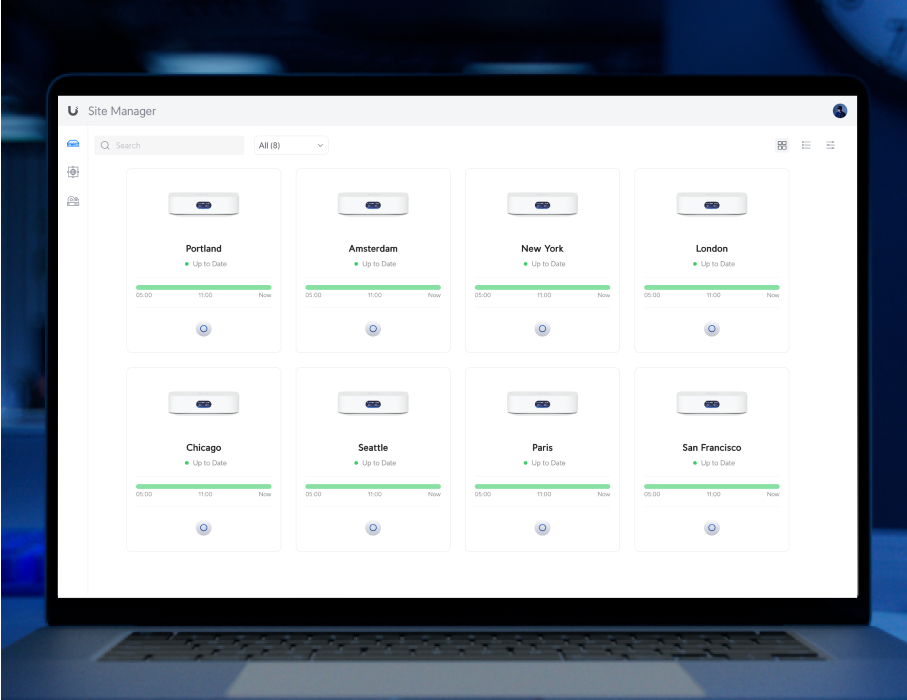
> UniFi Express supports up to 5 connected UniFi Network devices, including other UniFi Express units, switches, and WiFi access points.
Even my home has one AP per floor (3x) and 3x Unifi switches. This is clearly an artificial limitation for market segmentation reasons. I'm not going to rip out Unifi switches to go unmanaged, just for the pleasure of using Express. Hopefully nobody buys it without reading the small print.
I feel like the lack of Protect and the 5 UniFi device limit are going to really limit who will buy this even at this price.