> If only they didn't put the power button on the bottom.
I can't tell if anyone is being serious about the "Powergate" issue. The thing is 5" wide and weighs 1.5 lbs, it's not exactly a burden to lift it a little. And there are highly practical workarounds: https://www.reddit.com/r/macmini/comments/1gncek7/nailed_the...
I consider it a typical Tim Cook decision, in that the man led the company that made one of the fastest CPUs in the world, makes it draw as much as a Raspberry Pi. Absolutely crazy feats of engineering, design, manufacturing… and -
There is that ONE detail that would’ve made it perfected but it’s botched!
I don’t mind it too much, since it’s still 99% close to perfect.
Tim Cook cares about money and efficiency of building and moving product. That’s it. I highly doubt there’s been any important design detail about any product that he made himself.
Hah, Tim Cook decision pretty much sums it up; its the kind of thing that wouldn't have lasted 5 seconds when placed in front of Jobs (although there is a strong chance Jobs would have demanded his own nonsensical addition/subtraction to the design).
Jobs would have removed the power button entirely.
And then when there's a fault requiring a hard reset to fix you have to insert a bent paperclip into a tiny unlabeled hole on the bottom, or spell out a message in morse code by unplugging and re-plugging the power cord with some special timing. (This is not sarcasm)
Was Jobs in charge when they decide to place the power connector on the bottom of the "magic mouse"? But it's fine because it can fit in a manila envelope.
Jobs would have kept the button on the bottom, as it's not the proper way to use a computer.
Instead, he would have put motion/light sensors on the screen, so it would automatically wake up when you are sitting in front of it. Macs don't shutdown, they just go to sleep and wake up when you need them.
Yeah he likely would have said no ports, or lets have only one port, or he would have demanded that the Mac mini has the dimensions of some multiple of pi…
1. Given millions of things that are perfect it takes one of them for HN to lose its mind, power button happened to be it this time, Cook didn't decide that.
2. How often do people exactly have to turn off and on a mac that consumes less than a pi for them to constantly be reaching out to that power button?
It's not like Tim Cook personally decided to put the button there, but saying over many years he's aligned the company to be one that would leave the button there rather than bite the cost of putting it somewhere more ergonomic is something I can buy into. Seems like a way to improve margins generation over generation, which is the kind of thing he's obsessed with.
This is also the same Apple that made the G4 Cube: that felt like this in reverse, with Jobs driving them to make a capacitive touch button because of an obsession with a seamless surface.
Yes that's it. Jobs's annoyances were always about achieving a better product, a higher level of refinement or something of the sort. It was mostly about, "it can be better this way" and he was very often right even though sometimes not.
On the other hand, with Cook, it's always about cost cutting and corner cutting and the likes. It feels cheap (especially considering the pricing and brand aspirations) but also primitive and unrefined.
Which is why their price escalation was unjustified, if you want to charge a lot you need to figure out a no compromise product and, in my opinion, they have not been there a lot recently...
Shame they got rid of the ability to power the computer on and off from the keyboard. I know its been that way for some time, I'm sure there's good reason for it (maybe it doesn't work well over BT or something, or simply few generic keyboards offered the power button).
The comment in the article is in the context of rack mounting them which is a common thing to do with Mac minis. Having it on the bottom makes it hard to press as you can’t lift them up when they’re secured in a mount.
> Having it on the bottom makes it hard to press as you can’t lift them up when they’re secured in a mount
Hard rebooot is the only situation where you should be using the physical power button on a modern Mac. If you're installing Macs on a rack, presumably you can sudo shutdown -r.
The button on the bottom is trying to tell you that the system is built to be well behaved on stand by.
I am working on a solution to make it easier to hit the button from the front of a rack shelf, but the fact I have to mess with 3D printing just to hit a power button is silly.
Older Macs also had the power button on the back, which was also annoying, but at least a Mac that's secured to a shelf could have its power button pressed pretty easily.
The Mac mini _requires_ a mechanism to press up from the bottom in any permanent-ish install.
I would have thought that them being slightly higher than 1U would have precluded people from rack mounting them "flat" in the first place. It seems like it would be more efficient to rack mount them standing on their sides, and then the air gap between them would be enough to reach the power button easily.
Because the comment is very specifically talking about rack-mount installations. Granted, no matter you put the power switch, it's going to be difficult to reach if you install 21 of them on a single shelf.
> Apple VPs Greg Jozwiak and John Ternus explained in an interview to a Chinese content creator on Billibilli (spotted and machine-translated by ITHome) that the main reason the power button is on the bottom of the 2024 Mac Mini is because of the computer’s size. Since it was nearly half the size of the previous generation, the underside was “kind of the optimal stop” for a power button. They also say most users “never use the power button” on a Mac, anyway.
> Apple isn’t wrong here. The Mac mini measures 5 x 5 x 2 inches, compared to 7.75 x 7.75 x 1.4 inches from the last generation; it takes up much less space on your desk, which is great. The trade-off is that you run out of space for some important things, like a power button.
That explanation makes no sense. There are many mini PCs of the same size that have their power button in an accessible location.
The excuse that most users never use the power button is the "you're holding it wrong" of 2024. Stop telling me how to use your devices, Apple.
The explanation mentioned on several forums that it's a cost cutting measure to avoid extruding yet another hole in the aluminum case, or routing the power cable, makes no sense either. This is a state-of-the-art machine, yet they're cutting costs on such trivialities? Give me a break.
This is unequivocally poor design. Yet Apple will never publicly admit that, and will gaslight everyone to think it's actually good, as they usually do.
They've managed to get people to accept things they'll never accept in Intel or Android ecosystem. Like no SD card, no memory expansion, no dual SIM etc. That gives the confidence.
I guess once system shuts down you can switch off the power at the mains or adapter socket.
> The thing is 5" wide and weighs 1.5 lbs, it's not exactly a burden to lift it a little.
It's the difference between being able to hit the button one-handed or needing two hands. My Mac Mini is sitting at the back of my desk, and the power button is toward the rear end of the Mac, and I definitely find it a bit clumsy to reach back with two hands, flip it over (disturbing an wires/peripherals that might be plugged in), find the button, and press it.
> And there are highly practical workarounds
Not as practical as putting the button on the front or top.
It's certainly not a deal breaker, but I do find it mildly annoying. The ideal for me would be to have the button easily accessible on the front or top, and have it behave like other devices I use: a short press to sleep/wake, and a long press to initiate shutdown. And when I'm getting up from my desk, I could give it a quick tap to put it to sleep and lock it.
My workaround is to use a keyboard shortcut to put it to sleep, which it works fine and is not a big deal. But I still think Apple deserves a bit of mockery for this decision.
As with all things regarding power efficiency, you have to consider the wide use of these devices, not just the individual use.
If moving the power button there changes the behavior of thousands of people that would typically shut their computer down when they're not using it, that half glass of orange juice turns into thousands of gallons.
I have pressed the power button exactly once, since Friday (the day I got it). All other restarts were "soft" (including a couple of crashes). The keyboard and trackpad do fine, starting a shut-down computer.
It's replacing a docked MBP. That power button was a lot more difficult to reach, and I needed to hit it more often than this.
I spent a few minutes looking up whether a Mac could be booted from a Bluetooth keyboard but couldn't find any documentation of that. Back in the day some(?) Mac models could be booted by a USB keyboard, see https://www.projectgus.com/2023/04/griffin-imate/ for technical details.
I just bang on the spacebar, and it starts up. It's a Bluetooth keyboard, so I guess the system is listening to BT. I did that with the laptop, forever.
The Mini starts up a lot faster than the laptop.
That said, I should actually do a test, to make sure that the system is in real shutdown...
Nah. I'm wrong. The laptop started that way, probably because the keyboard is attached to a CalDigit dock, and tapping on the keyboard probably sent power to the device, which starts it.
That doesn't happen with the Mini, if I actually do a shutdown from the menu.
Apple has something I think they call "Deep Sleep," which is basically a shutdown, and that wakes from the keyboard.
That said, it's not a big deal to reach under the left side, and tap the button. The laptop was a pain, because I had to open it up.
But I've only had this thing a few days, and haven't had a chance to really torture it, yet.
It's probably easier to find and press than the old 27" iMacs. I always had a brief moment of trouble feeling around the back to find that darn button (part of the reason is that you need to press it very infrequently).
I can't imagine it's anything but a silly comment. Macs have the equivalent of wake-on-LAN, plus you can configure them trivially to restart after power loss. The idea that you'd have to press the button often is just silly.
Given my cat, after learning to press a button on his automated feeder, now presses anything that looks like a button with the curious expectation of food, I can only presume he got out while I was in Cupertino.
Button on the bottom isn't a design mistake. It's an opinionated choice.
Sounds vaguely like "you're holding it wrong". Maybe it was always supposed to be placed on its side? Apple should clarify why the button is on the bottom.
Minis are rarely racked in bulk unless you're running a server farm, which is not the use case they design for. The MacMini is first and foremost a desktop computer for non-professional people or at least not sysadmins. If people want to rack them, go ahead, but in that case how often are you hard rebooting a machine vs soft reboot anyways? Macs aren't known for freezing up too much.
Either way, it works for the use case its designed for.
Some of the rackmount kits for previous generations already reroute the power button and connectors to the front, like this https://racknex.com/wp-content/uploads/2023/04/with-power-bu.... (Though why not just install it backwards?) I guess they will be able to run a little lever under the M4 model the same way.
Actually, the M4 model is a little taller so it no longer fits in a 1U rack mount. Whereas before you could fit 2 horizontally in 1U, now you'd possibly fit 8 or 9 vertically in 3U. (Edit: This company says 10 per 2U https://www.racksolutions.com/m4-mac-mini-apple-hypershelf.h....)
I think the airflow for more than 3 per 1.33u, or 8-9 per 3u will necessarily suck.
I have designed for both, I think both have great use cases. 2 x 8 in 6u is really neat and tidy, I just don't love the concept of sitting the fans on their side, though I think they'll still last 5 years.


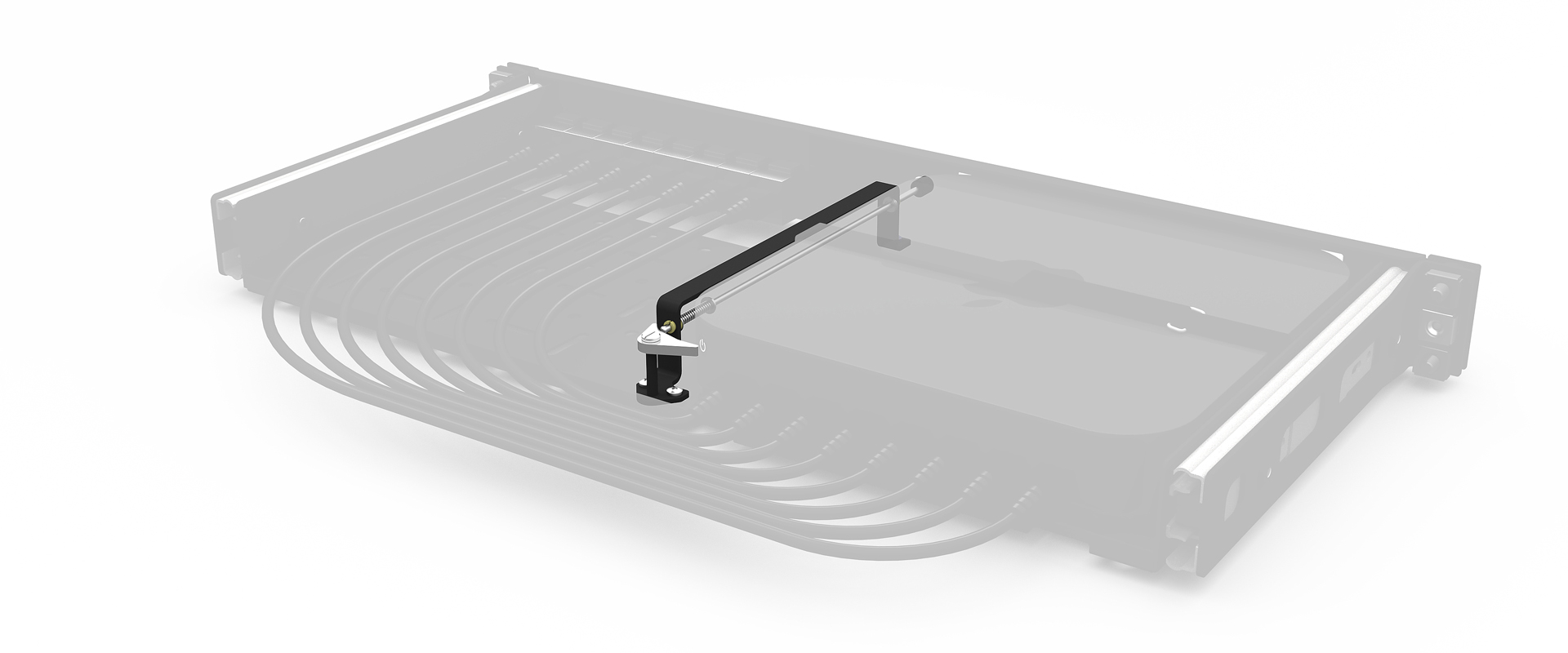
I can't tell if anyone is being serious about the "Powergate" issue. The thing is 5" wide and weighs 1.5 lbs, it's not exactly a burden to lift it a little. And there are highly practical workarounds: https://www.reddit.com/r/macmini/comments/1gncek7/nailed_the...