> Any power users who prefer their own key management should follow the steps to enable Bitlocker without uploading keys to a connected Microsoft account.
Except the steps to to that are disable bitlocker, create a local user account (assuming you initially signed in with a Microsoft account because Ms now forces it on you for home editions of windows), delete your existing keys from OneDrive, then re-encrypt using your local account and make sure not to sign into your Microsoft account or link it to Windows again.
A much more sensible default would be to give the user a choice right from the beginning much like how Apple does it. When you go through set up assistant on mac, it doesn't assume you are an idiot and literally asks you up front "Do you want to store your recovery key in iCloud or not?"
> make sure not to sign into your Microsoft account or link it to Windows again
That's not so easy. Microsoft tries really hard to get you to use a Microsoft account. For example, logging into MS Teams will automatically link your local account with the Microsoft account, thus starting the automatic upload of all kinds of stuff unrelated to MS Teams.
In the past I also had Edge importing Firefox data (including stored passwords) without me agreeing to do so, and then uploading those into the Cloud.
Nowadays you just need to assume that all data on Windows computers is available to Microsoft; even if you temporarily find a way to keep your data out of their hands, an update will certainly change that.
Yes, they push the MS account stuff very hard. I've found Windows so actively hostile to the user that I basically only use Linux now.
I used to be a windows user, it has really devolved to the point where it's easier for me to use Linux (though I'm technical). I really feel for the people who aren't technical and are forced to endure the crap that windows pushes on users now.
That’s the real problem MS has. It’s becoming a meme how bad the relationship between the user and windows is. It’s going to cause generational damage to their company just so they can put ads in the start menu.
I switched from Windows to Mac 15 years ago. It was a revelation when the terrible habits of verbally abusing my computer and anxiety saving files every 22 seconds just evaporated.
Those old habits have been creeping back lately through all the various *OS 26 updates. I too now have Linux on Framework. Not perfect, but so much better for my wellbeing.
I bought and returned an AMD Framework. I knew what I was getting into, but the build quality + firmware quality were lacking, sleep was bad and I'm not new to fixing Linux sleep issues. Take a look at the Linux related support threads on their forum.
I've been using AMD EliteBooks, the firmware has Linux happy paths, the hardware is supported by the kernel and Modern Standby actually works well. Getting one with a QHD to UHD screen is mandatory, though, and I wouldn't buy a brand new model without confirming it has working hardware on linux-hardware.org.
If you look online, HP has a YouTube channel with instructional videos for replacing and repairing every part of their laptops. They are made to make memory, storage and WiFi/5G card replacements easy, parts are cheap and the after market for them is healthy.
I've also had good luck with their support, they literally overnight'd a new laptop with a return box for the broken one in a day.
We have Elitebooks at work and can confirm that the 8x0 series, at least until G8, has superb Linux support out of the box (and I run Arch, by the way). IME it's actually better than Windows, since both my AMD and Intel models have had things not working on Windows (the AMD still often hangs during sleep).
> Getting one with a QHD to UHD screen is mandatory
But I have to ask: are those screens actually any good? Ours have FHD panels, and I have not seen a single one with a decent screen.
There are roughly two categories: either the el-cheapo screens, with washed-out colors (6 bpp panels on a 1500 EUR laptop!) and dimmer than the moonlight through closed shades, but they have usable angles; or the "sure view" version with very bright backlight, usable outside (not in direct sunlight, of course) with, on paper, ok colors (specs say 100% sRGB) but laughably bad viewing angles (with the sureview off, of course) and, in practice, questionable color fidelity.
These are also fairly expensive, around 1500 EUR, and the components are of questionable quality. The SSDs in particular are dog-slow (but they're very easy to replace).
I have two 5-year-old 840 G8s (one Intel, one AMD), and they have both held up fine, but I usually don't abuse my laptops (my 2013 MBP still looks brand new aside from some scratches). However, looking around at my colleagues' laptops, they tend to fall apart, and I can count on one hand the ones still in good shape. The usual suspects seem to be the barrel power connector and the keyboard. Newer models only have USB-C AFAIK (mine have both, but came with a USB-C power adapter in the box). But they tend to look pretty bad in general, with very misaligned panels and fragile USB ports.
> But I have to ask: are those screens actually any good? Ours have FHD panels, and I have not seen a single one with a decent screen.
Yeah, I brought up the screens because the FHD screens are not good and there's a chance you might end up with a SureView screen. The QHD screens suit my needs, they support HDR and higher refresh rates. I'm not a designer or someone who can speak to color quality/contrast/etc, though.
I eventually had an issue with the keyboard on a G8 model, a key popped off 3 years into using it, but I've also had that same issue with the keyboard of every laptop I've owned including every MacBook from 2006-2018, so the problem is likely me.
> These are also fairly expensive, around 1500 EUR, and the components are of questionable quality. The SSDs in particular are dog-slow (but they're very easy to replace).
I buy them on the consumer side when there's a >60% off sale, I would not pay the sticker price for them, and get them with the intention of replacing the innards so I spec them out with the least I can.
If you don't care about new, if you buy Ebay open box/refurbished Elitebooks, you can find recent ones for a few hundred bucks with HP support for a year or more. The overnight laptop replacement I got was for a refurbed Elitebook I bought on Ebay and HP replaced it without question.
> Yeah, I brought up the screens because the FHD screens are not good and there's a chance you might end up with a SureView screen.
I actually prefer the SureView to the regular one for code / office work because it's much brighter and usable outside in the summer if there's shade. The other one needs to be at least at 80% brightness inside to be usable. Then again, it's OK in the dark, so YMMV.
> I'm not a designer or someone who can speak to color quality/contrast/etc, though.
Right, but those panels are quite bad, so I think it's good you've advised people to steer clear of them. Then again, some people don't care, so they could save a buck or two. Lower resolution is also easier to deal with for people still running X11 and multiple screens.
> I buy them on the consumer side when there's a >60% off sale [...] you can find recent ones for a few hundred bucks with HP support for a year or more.
Huh, I dind't know they got so low even relatively new. I was looking for some sff desktops on ebay the other day, and previous-gen ones weren't much cheaper than brand new current gens (I was looking in the EU).
I think for people who don't care about "great" screens but do care about Linux support these are a really great deal, especially if you don't expect to abuse them.
I'm generally very happy with my 845 G8, I only ever hear its fan when compiling. The only thing it's missing is thunderbolt, but AFAIK this wasn't available on AMD CPUs at all at the time.
Lenovo T and X series are excellent and cheap as dirt used. There is also System 76. Or you could get a MacBook and boot Linux on that. Some older ones work well, I hear.
> Or you could get a MacBook and boot Linux on that. Some older ones work well, I hear.
Is linux support on the M1/M2 models as good as linux support on x86 laptops? My understanding was that there's still a fair bit of hardware that isn't fully supported. Like, external displays and Bluetooth.
I use an old Lenovo AIO PC to dual boot Linux Mint and Windows 10. It works well from a hardware and firmware perspective, but I've deliberately avoided Windows 11 as it is crapware.
I have done triple booting of MacOS, Linux and Windows on an old Mac Mini, and it was a nightmare to get them working, but worked well once set up.
I think well known brands and models of PCs are better for such alternative setups, rather than obscure PCs.
They don't. I don't know what they're talking about, but I've had fewer problems with linux on my framework than weird stuff on my OSX work machine. And I'm running Alpine on my framework, so if anything should be wonky it's this one.
I've used Dell Inspiron laptops in the past, never had a problem. WiFi, multimonitor output, bluetooth, etc all work out of the box with Debian or Ubuntu.
I've had very few issues with Lenovo and Toshiba. They're generally somewhat repairable. EliteBook and Z Book from HP seems fine for Linux too, but I've never had to fiddle with hardware except that I once removed a battery from an EliteBook.
It’s funny because I started with Windows 3.1 and it was actively user hostile then. From 3.1 to XP it was awful. Then it got slightly better with 7, and went downhill from there.
Realistically, a major Linux distro is the most user-beneficial thing you can do and today it is easier than ever. If my 12 year old can figure out how to use it productively, so can anyone. Switch today and enjoy.
Maoboro cigarettes uaed to be for women, including red tipped filters to hide lipstick marks. Sales waned, so they actually rebranded the cigarette for men, and even succeeded in making it a definition of manliness.
Advertising stories like that, make sure M$ execs could care less about damage to their image.
You just have to look at who buys Windows to understand this. It's OEM's and enterprises. Almost nobody buys an individual license. That's why they don't care. As an individual you get what your employer or hardware supplier says, like it or lump it.
Linux is so much better than it used to be. You really don't need to be technical.
I have been recommending Kubuntu to Windows people. I find it's an easier bet than Linux Mint. You get the stability of Ubuntu, plus the guarantee of a Windows-like environment.
Yes, I know, Linux Mint supports Plasma, but I honestly think the "choose your desktop" part of the setup process is more confusing to a newbie than just recommending a distro with the most Windows-like UI and a straightforward installation.
Generally I recommend people use PopOS. It's well suited for laptops, as that's what System76 is focused on a they're shipping laptops with Nvidia GPUs. I personally prefer Arch based distorts like endeavor but even with wide community support it's just more likely a noob will face an error. Fwiw I've only faced one meaningful error in the last 3 years in endeavor but I've also been daily driving Linux for 15 years now
I’ve been using PopOS for the last five years and while I generally agree… the latest release using Cosmic by default has a lot to be desired. Cosmic will eventually be good but right now it’s far from it and I had to install Gnome as a stop gap just to have a functional desktop environment. I’ll probably ditch PopOS for Arch + KDE but I haven’t had the time to do so yet for my workstation.
Truly, and to really drive it home, I’ve loved PopOS but this latest release is just too half baked. I think anyone considering it should either wait a year or use something else, and Kubuntu seems like a reasonable alternative for people coming from Windows or MacOS.
I'd give kde a shot. It's been my preferred DE for years. But check out the below wiki and poke around for what your style is. The beauty of linux is adapting to you and switching DEs is a quick change (you do not need to change your DM to change your DE).
If you're interested on Arch then give something like EndeavourOS a shot. Cachy is getting popular these days too but I haven't used it. But I feel its going to be as easy as using Endeavour or Manjaro and those are very convenient distros for Arch with direct Nvidia GPU support. Though if you want you learn Linux I suggest going Vanilla Arch. You'll learn a lot from the install process (it isn't uncommon to mess up. You won't brick anything and learning about the chroot environment will help you in the future of you do mess things up)
Eh, not for laptops - I say as someone who switched to Linux from windows in past year.
I have spent a decent few days to get long battery life on Linux (fedora), with sleep hibernate + encryption. And I am still thinking that the Linux scheduler is not correctly using Intel's pcore/ecore on 13th gen correctly.
If you have an Nvidia GPU you're generally going to need to edit the systemd services and change some kernel settings. This is a real pain point to be honest and it should be easier than it is (usually not too bad tbh)
If you want I can try to help you debug it. I don't have a fedora system but I can spin up a VM or nspawn to try to match your environment if you want
I just got a lunar lake laptop and in CachyOS you can just enable either scx_lavd or scx_bpfland from the kernel settings. I use them both: bpfland guarantees that the active application runs smoothly even if you compile code in the background, and lavd focuses on energy saving a bit more. They both understand how to use the P and E cores: especially the lavd scheduler puts the active app to a P core and all the background apps to the E cores.
Do we have confirmation that it’s a must to upload the key if you use an MS account with Windows? Is it proven that it's not possible to configure Windows to have an MS account linked, maybe even to use OneDrive, while not uploading the BitLocker key?
Btw - my definition of “possible” would include anything possible in the UI - but if you have to edit the registry or do shenanigans in the filesystem to disable the upload from happening, I would admit that it’s basically mandatory.
I just checked on my personal desktop, which has Windows 11 installed using a local user account and is signed into my MS account for OneDrive and my account is listed as having no recovery codes in the cloud. I don’t recall editing anything in the registry to accomplish this it was the default behavior for having a local user account. I copied my recovery codes when I built the machine and pasted them into an E2EE iPhone note which should allow me to recover my machine if disaster strikes (also everything is backed up to Backblaze using their client side encryption).
>Nowadays you just need to assume that all data on Windows computers is available to Microsoft; even if you temporarily find a way to keep your data out of their hands, an update will certainly change that.
I get why the US would not, but I really wish the rest of the world looked at this like the security and sovereignty issue that it is.
Or: Put all of Windows inside of a VM, within a host that uses disk encryption -- and let it run amok inside of its sandbox.
I did this myself for about 8 years, from 2016-2024. During that time my desktop system at home was running Linux with ZFS and libvirt, with Windows in a VM. That Windows VM was my usual day-to-day interface for the entire system. It was rocky at first, but things did get substantially better as time moved on. I'll do it again if I have a compelling reason to.
With a VM running on an encrypted file system, whatever a warrant for a bitlocker key might normally provide will be hidden behind an additional layer that Microsoft does not hold the keys to.
(Determining whether that is useful or not is an exercise for the person who believes that they have something to hide.)
Sure, the plan you outline does sound very simple. And in an ideal world, that'd be perfectly fine.
Except we don't live in an ideal world.
See, for example, the fuckery alluded to above.
Therein: Linking a Microsoft account to a Windows login is something that appears to happen automatically under some circumstances, and then bitlocker keys are also automatically leaked to the mothership...
The machine is quite clearly designed with the intent that it behaves as a trap. Do you trust it?
If you believe Windows to be so actively malicious that it would go behind your back and enable key backups after you've explicitly disabled them, you should probably assume that it will steal your encrypted information in other ways too.
This continued usage of the word "you," as if directly and specifically targeted at me, that you're using: At first, I thought it was a mistake, but now I'm pretty sure that it is a very deliberate word choice on your part.
Therefore, based on that...
Since this is about me, then: I'd like to ask that you please stop fucking with me.
We can discuss whatever concepts that you'd like to discuss, in generalities, but I, myself, am not on the menu for discussion.
It's not just Teams. You need to be constantly vigilant not to make any change that would let them link your MS account to Windows. And they make it more and more difficult not only to install but also use Windows without a Microsoft account. I think they'll also enforce it on everybody eventually.
You need to just stop using windows and that's it.
The only windows I am using is the one my company makes me use but I don't do anything personal on it. I have my personal computer next to it in my office running on linux.
doing things like that which is completely unrelated should be considered data theft, and microsoft should be punished so severely they wish they never had the idea to begin with
In the startup world, BYOD is/was exceedingly common. All but two jobs of my career were happy to allow me to use my own Linux laptop and eschew whatever they were otherwise going to give me.
Obviously enterprises aren’t commonly BYOD shops, but SMBs and startups certainly can be.
… whether the people who would do such BYOD things are at all likely to be Windows users who care about this Bitlocker issue, is a different debate entirely.
I know BYOD was common (although getting a fully specced MacBook Pro was often one of the “perks”), but typically you did get (some) budget or reimbursement for using your own device. So in a sense the company was paying for your device which allows you to buy a dedicated machine.
I also notice that it helps in segmenting in the brain to use separate devices for private and business use.
I’ve been diving down the BYOD rabbit hole recently. At enterprise scale it’s not “hook in with your vpn, job done”, it’s got to be managed. Remote wipe on exit, prove the security settings, disk encryption, EDR.
What this means for the user is your personal device is rather invasively managed. If you want Linux, your distro choice may be heavily restricted. What you can do with that personal device might be restricted (all the EDR monitoring), and you’ll probably take a performance and reliability hit. Not better than just a second laptop for most people.
teams works fine in website form for me because it IS a website (that uses an extra ~1gb of ram running as a desktop app because its also a separate browser)
That's actually a misunderstanding that blew up to an outright lie:
The Start Menu is fully native. The "Recommended" section (and only it) is powered by a React Native backend, but the frame & controls are native XAML. (I.e. there's a JS runtime but no renderer)
All "Global Reader" accounts have "microsoft.directory/bitlockerKeys/key/read" permission.
Whether you opt in, or not, if you connect your account to Microsoft, then they do have the ability fetch the bitlocker key, if the account is not local only. [0] Global Reader is builtin to everything +365.
> Because hypotheticals that they could are not useful.
Why? They are useful to me and I appreciate the hypotheticals because it highlights the gaps between "they can access my data and I trust them to do the right thing" and "they literally can't access my data so trust doesn't matter."
Considering all the shenanigans Microsoft has been up to with windows 11 and various privacy, advertising, etc. stuff?
Hell, all the times they keep enabling one drive despite it being really clear I don’t want it, and then uploading stuff to the cloud that I don’t want?
I have zero trust for Microsoft now, and not much better for them in the past either.
This 100% happens, they’ve done it to at least one of my clients in pretty explicit violations of HIPAA (they are a very small health insurance broker), even though OneDrive had never been engaged with, and indeed we had previously uninstalled OneDrive entirely.
One day they came in and found an icon on their desktop labeled “Where are my files?” that explained they had all been moved in OneDrive following an update. This prompted my clients to go into full meltdown mode, as they knew exactly what this meant. We ultimately got a BAA from
Microsoft just because we don’t trust them not to violate federal laws again.
What do Entra role permissions have to do with Microsoft's ability to turn over data in its possession to law enforcement in response to a court order?
> MS doesn't have a magic way to reach into your laptop and pluck the keys.
Of course they do! They can just create a Windows Update that does it. They have full administrative access to every single PC running Windows in this way.
It's largely the same for all automatic updating systems that don't protect against personalized updates.
I don't know the status of the updating systems of the various distributions; if some use server-delivered scripts run as root, that's potentially a further powerful attack avenue.
But I was assuming that the update process itself is safe; the problem is that you usually don't have guarantees that the updates you get are genuine.
So if you update a component run as root, yes, the update could include malicious code that can do anything.
But even an update to a very constrained application could be very damaging: for example, if it is for a E2EE messaging application, it could modify it to have it send each encryption key to a law enforcement agency.
> the problem is that you usually don't have guarantees that the updates you get are genuine
A point of order: you do have that guarantee for most Linux distro packages. All 70,000 of them in Debian's case. And all Linux distro distribute their packages anonymously, so they can never target just one individual.
That's primarily because they aren't trying to make money out of you. Making money requires a billing relationship, and tracking which of your customers own what. Off the back of that governments can demand particular users are targeted with "special" updates. Australia in particular demands commercial providers do that with its "Assistance and Access Bill (2018)" and I'm sure most governments in the OECD have equivalents.
Yes, they can do that. But they can't select who gets the binary, so everybody gets it. Debian does reproducible builds on trusted machines so they would have to infect the source.
You can safely assume the source will be viewed by a lot of people over time, so the change will be discovered. The source is managed mostly by git, so there would be history about who introduced the change.
The reality is open source is so far ahead on proprietary code on transparency, there is almost no contest at this point. If a government wants to compromise proprietary code it's easy, cheap, and undetectable. Try the same with open source it's still cheap, but the social engineering ain't easy, and it will be detected - it's just a question of how long it takes.
Not really, but it's quite complex for Linux because there are so many ways one can manage the configuration of a Linux environment. For something high security, I'd recommend something like Gentoo or NixOS because they have several huge advantages:
- They're easy to setup and maintain immutable and reproducible builds.
- You only install the software you need, and even within each software item, you only build/install the specific features you need. For example, if you are building a server that will sit in a datacentre, you don't need to build software with Bluetooth support, and by extension, you won't need to install Bluetooth utilities and libraries.
- Both have a monolithic Git repository for packages, which is advantageous because you gain the benefit of a giant distributed Merkle tree for verifying you have the same packages everyone else has. As observed with xz-utils, you want a supply chain attacker to be forced to infect as many people as possible so more people are likely to detect it.
- Sandboxing is used to minimise the lines of code during build/install which need to have any sort of privileges. Most packages are built and configured as "nobody" in an isolated sandbox, then a privileged process outside of the sandbox peeks inside to copy out whatever the package ended up installing. Obviously the outside process also performs checks such as preventing cool-new-free-game from overwriting /usr/bin/sudo.
- The time between a patch hitting an upstream repository and that patch being part of a package installed in these distributions is fast. This is important at the moment because there are many efforts underway to replace and rewrite old insecure software with modern secure equivalents, so you want to be using software with a modern design, not just 5 year old long-term-support software. E.g. glycin is a relatively new library used by GNOME applications for loading of untrusted images. You don't want to be waiting 3 years for a new long-support-support release of your distribution for this software.
No matter which distribution you use, you'll get some common benefits such as:
- Ability to deploy user applications using something like Flatpak which ensures they are used within a sandbox.
- Ability to deploy system applications using something like systemd which ensures they are used within a sandbox.
Microsoft have long underinvested in Windows (particularly the kernel), and have made numerous poor and failed attempts to introduce secure application packaging/sandboxing over the years. Windows is now akin to the horse and buggy when compared to the flying cars of open source Linux, iOS, Android and HarmonyOS (v5+ in particular which uses the HongMeng kernel that is even EAL6+, ASIL D and SIL 3 rated).
Furthermore it seems like it's specific to Azure AD, and I'm guessing it probably only has effect if you enable to option to back up the keys to AD in the first place, which is not mandatory
I'd be curious to see a conclusive piece of documentation about this, though
Regular AD also has this feature, you can store the encryption keys in the domain controller. I don't think it's turned on by default, but you can do that with a group policy update.
That's for Entra/AD, aka a workplace domain. Personal accounts are completely separate from this. (Microsoft don't have a AD relationship with your account; if anything, personal MS accounts reside in their own empty Entra forest)
Note that password-based Bitlocker requires Windows Pro which is quite a bit more expensive.
> sign into your Microsoft account or link it to Windows again.
For reference, I did accidentally login into my Microsoft account once on my local account (registered in the online accounts panel). While Edge automatically enabled synchronization without any form of consent from my part, it does not look like that my Bitlocker recovery key is listed on https://account.microsoft.com/devices/recoverykey. But since I unlinked my account, it could be that it was removed automatically (but possible still cached somewhere).
Not anymore, modern hardware running Windows 11 Home now also has FDE, technically running on BitLocker, just that it's called "Device Encryption" and doesn't have the same options:
> For reference, I did accidentally login into my Microsoft account once on my local account (registered in the online accounts panel)
Those don't usually count as the "primary" MS account and don't convert a local account. For example, you can have a multiple of those, and generally they're useful to save repeated signins or installing stuff from the Microsoft Store that require a personal account.
Yes, Windows 11 Home has FDE and I used it, but no password unlock. Attempting to switch to password unlocking will result in an error saying that password unlocking is not available in the current Windows edition. TPM based unlocking did work on Home for example. (but required entering the recovery key after every reboot to Fedora for some reason).
> Note that password-based Bitlocker requires Windows Pro which is quite a bit more expensive.
Given that:
1. Retail licenses (instead of OEM ones) can be transferred to new machines
2. Microsoft seems to be making a pattern of allowing retail and OEM licenses to newer versions of Windows for free
A $60 difference in license cost, one-time, isn't such a big deal unless you're planning on selling your entire PC down the line and including the license with it. Hell, at this point, I haven't purchased a Windows license for my gaming PC since 2013 - I'm still using the same activation key from my retail copy of Windows 8 Pro.
This amounts to a difference of 114€ or 135$ at the current exchange rate which is significantly more. Also surprised that Windows Pro is 189% of the price of the Home edition in France but 143% in the USA.
I initially bought the Home edition but could not upgrade to pro without buying a full license so I had to bear the full cost of the French Pro license, which lead to an upgrade cost of 259€ instead of just $60. (basically I had to buy the pro version to get password unlock with Bitlocker since TPM unlock was broken with dual boot, needed to enter the recovery key after every boot to Fedora). If it was possible to only pay for the difference they did not make it obvious.
And in general paying this much for an OS that still pushes dark pattern and ads onto me leaves quite a bad taste in my mouth; I wouldn't mind paying a subscription if I could get an OS that does what I want and gets fully out of my way. (but I guess subscription would come with mandatory online accounts which is part of the problem at hand here).
You can turn it off without resorting to a local account, although it's non-obvious.
GPEdit -> Computer Configuration → Administrative Templates → Windows Components → BitLocker Drive Encryption → Operating System Drives → “Choose how BitLocker-protected operating system drives can be recovered”
No, the actual data encryption key doesn't need to change unless you're very paranoid. The backup key and your normal key is just to decrypt the data encryption key.
Exactly. I question why the parent says you have to re-encrypt the drive.
Microsoft has the KEK or passphrase that can be used to derive the KEK. The KEK protects the DEK which is used to encrypt the data. Rotating the KEK (or KEKs if multiple slots are used) will overwrite the encrypted DEK, rendering the old KEK useless.
Or does BitLocker work differently than typical data at rest encryption?
BitLocker recovery keys are essentially the key to an at-rest, local copy of the real key. (I.e., they need access to the encrypted drive to get the real encryption key)
When you use a recovery key at preboot, it decrypts that on-disk backup copy of the encryption key with your numerical recovery key, and uses the decrypted form as the actual disk encryption key. Thus, you can delete & regenerate a recovery key, or even create several different recovery keys.
Only because others you communicate with may not have ADP turned on, which is a flaw with any service that you cannot control what the other end does or does not do, not unique to Apple/iMessage outside of using something like Signal.
Most other E2EE messaging services do not break their own E2EE by intentionally uploading messages or encryption keys to servers owned by the same company in a form that they can read. For example, Google's Messages app does not do this for E2EE conversations. This isn't something that only Signal cares about.
The security of the E2EE in Android's cloud backup system was audited by NCC group with the results published publicly. And as one of the most widely used messaging apps in the world, using a standardized protocol for E2EE, Google's Messages app has been studied by security researchers who almost certainly would have discovered this by now. OTOH, Apple's iMessage is documented to do non-E2EE backups that Apple can read.
Does using the "manage-bde -protectors -add" command to add a device key encrypted by a local recovery key, followed by the "manage-bde -protectors -delete" command to delete the device key encrypted by the uploaded key not work?
They could have taken a more defence-in-depth approach to key storage and encrypted the cloud copy of the Bitlocker key with a random master key itself protected by a user password-derived key arrangement, with any crypto action occuring on the device to avoid knowledge of the plaintext key. That way the Bitlocker key stored in the cloud is opaque to Microsoft, and only by knowing the user's current cleartext password could they access the raw Bitlocker key.
The current approach is weak, and strikes me as a design unlikely to be taken unless all the people involved were unfamiliar with secure design (unlikely IMO), or they intentionally left the door open to this type of access.
>Except the steps to to that are disable bitlocker, create a local user account (assuming you initially signed in with a Microsoft account because Ms now forces it on you for home editions of windows), delete your existing keys from OneDrive, then re-encrypt using your local account and make sure not to sign into your Microsoft account or link it to Windows again.
1. Is there any indication it forcibly uploads your recovery keys to microsoft if you're signed into a microsoft account? Looking at random screenshots, it looks like it presents you an option https://helpdeskgeek.com/wp-content/pictures/2022/12/how-to-...
2. I'm pretty sure you don't have to decrypt and rencrypt the entire drive. The actual key used for encrypting data is never revealed, even if you print or save a recovery key. Instead, it generates a "protectors", which encrypts the actual key using the recovery key, then stores the encrypted version on the drive. If you remove a recovery method (ie. protector), the associated recovery key becomes immediately useless. Therefore if your recovery keys were backed up to microsoft and you want to opt out, all you have to do is remove the protector.
You can encrypt a Bitlocker volume without syncing your keys even if you do log in with a Microsoft account, at least last time I was configuring Bitlocker.
Again, that is a lot of trust since it could trivially just… not show it. Which is already the default for most FDE systems for intermediate/system managed keys.
It could also just pretend to encrypt your drive with a null key and not do anything, either.
You need some implicit trust in a system to use it. And at worst, you can probably reverse engineer the (unencrypted) BitLocker metadata that preboot authentication reads.


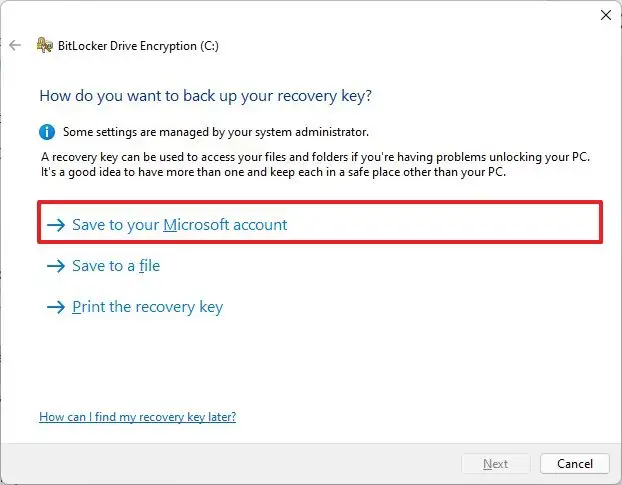
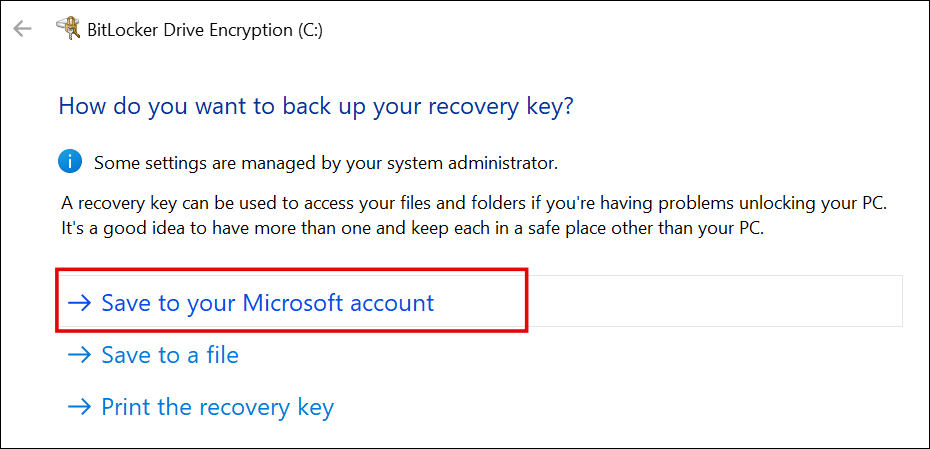
Except the steps to to that are disable bitlocker, create a local user account (assuming you initially signed in with a Microsoft account because Ms now forces it on you for home editions of windows), delete your existing keys from OneDrive, then re-encrypt using your local account and make sure not to sign into your Microsoft account or link it to Windows again.
A much more sensible default would be to give the user a choice right from the beginning much like how Apple does it. When you go through set up assistant on mac, it doesn't assume you are an idiot and literally asks you up front "Do you want to store your recovery key in iCloud or not?"